Cloudflare Radar data puts Googlebot behind roughly 23.7% of all HTTP requests from legitimate web crawlers, more than any other bot active on the internet today. That one number tells you why crawl management sits underneath every organic search strategy, whether an SEO team realizes it or not. And yet most marketers, site owners, and even seasoned SEO professionals stumble when asked simple questions about it. How does Googlebot actually find a page? What causes a crawl budget problem that quietly stalls a campaign’s visibility? Why does a URL show up as “crawled” in Search Console while still failing to rank or send traffic?
This guide is for people who need more than crawler trivia: SEO practitioners, digital marketers, and site owners looking for a working, strategy-level grip on technical SEO. It walks through the full discovery-to-indexing pipeline, Googlebot’s technical specs, the mechanics of crawl budget, and the levers you actually have over its behavior. Updated to reflect how Google Search, mobile-first indexing, SEM, and AI-driven search overviews function in 2026.
What Is Googlebot?
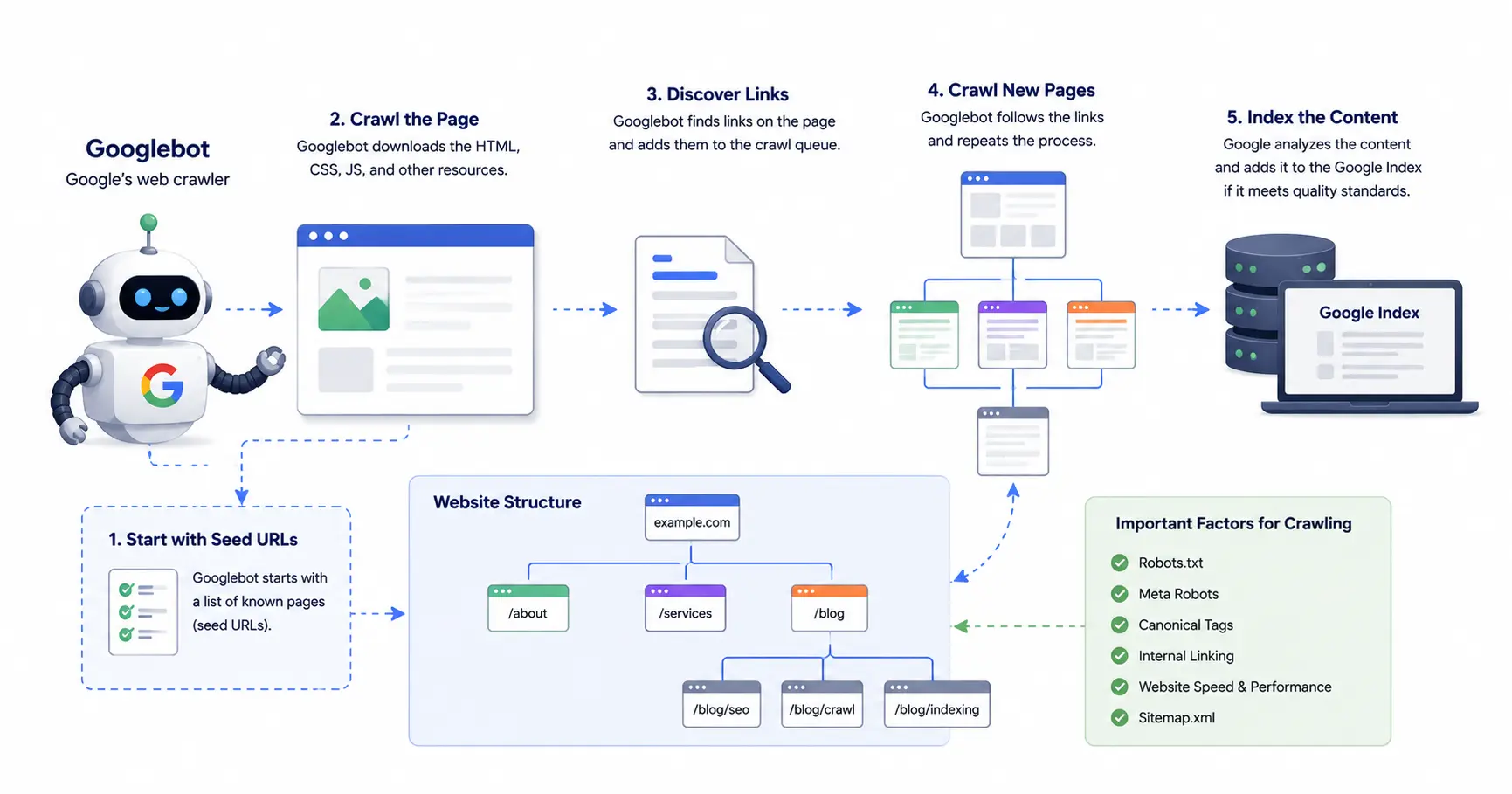
Googlebot isn’t a single program. It’s Google’s umbrella term for the automated crawlers (spiders, some people still call them) that discover, fetch, and render pages so Google Search can build its index. In practice it behaves much like a browser: request a URL, download whatever comes back, follow the links inside it, and pass the content along for indexing and ranking.
Google’s documentation splits Googlebot into two primary types. Googlebot Smartphone simulates a mobile visitor and handles the vast majority of crawl traffic on nearly every site. Googlebot Desktop simulates a desktop visitor, primarily to check that desktop content matches what mobile users see. Both identify themselves via the HTTP user-agent header, but here’s a detail that trips people up: both obey the exact same product token in robots.txt. You cannot block Googlebot Desktop while letting Googlebot Smartphone through using robots.txt rules alone. A disallow rule aimed at “Googlebot” blocks them both.
Googlebot Smartphone vs. Googlebot Desktop
Mobile-first indexing means Googlebot Smartphone now handles the overwhelming share of crawl requests, and it’s the mobile-rendered version of your pages that actually lands in Google’s index and drives ranking signals. Googlebot Desktop still shows up regularly, but mainly as a parity check rather than a primary indexing pass. If your mobile experience hides content, navigation, or structured data that your desktop version exposes, that hidden material risks getting excluded from the index entirely, no matter how polished the desktop page looks.
Other Types of Googlebot: Specialized Crawlers Explained
A handful of specialized bots run on the same underlying crawling and rendering tech, each carrying its own user-agent string:
- Googlebot Image and Googlebot Video: crawl media for Google Images and Video results
- Googlebot News: crawls content destined for Google News
- Google StoreBot: focuses on e-commerce and shopping pages
- Google-InspectionTool: powers manual tools like URL Inspection and the Rich Results Test
- GoogleOther and its variants (GoogleOther-Image, GoogleOther-Video): support internal research and product development, outside standard indexing
- Google-CloudVertexBot: tied to Google Cloud’s Vertex AI crawling activity
- Google-Extended: governs whether your content can train Google’s generative AI and AI Overviews, a separate switch from standard search indexing. As AI-generated results take up more real estate on the SERP, this token matters more every quarter.
Googlebot runs as what Google calls an evergreen renderer, meaning its rendering engine tracks a recent version of Chromium instead of some frozen, outdated browser snapshot. Modern JavaScript frameworks are generally handled fine, though rendering still has real, practical limits. More on that shortly.
How Does Googlebot Discover New Pages?

Link-following is still the backbone of discovery. Googlebot finds most new pages by crawling links on pages it already knows about, which is exactly why internal linking structure has such an outsized effect on crawlability. On top of that baseline, Google also pulls in URLs through:
- XML sitemaps
- RSS and Atom feeds
- Direct submissions via the URL Inspection tool in Search Console
- Bulk submissions through the Indexing API, though this is officially limited to specific content types like job postings and livestreams (people misuse it for general pages anyway)
Picture a blog post with zero internal links pointing to it. It can sit undiscovered for weeks until an external site links to it, or someone manually submits the URL. Google has said outright that trying to keep a page “secret” by simply avoiding links to it rarely works in practice. Even one outbound link from that page to somewhere else can expose its URL through referrer data sitting in another server’s logs.
The Googlebot Crawl-to-Index Pipeline: 4 Steps
Step 1: URL Discovery and Prioritization. Google keeps a running crawl queue assembled from sitemaps, followed links, and direct submissions, then ranks which URLs to fetch first based on perceived importance, how often a page has historically changed, and overall crawl demand for the site.
Step 2: Fetching the Page (Crawling). Googlebot requests your server and downloads the raw HTML along with everything referenced inside it: CSS, JavaScript, images, and any API calls needed to fully assemble the page. Each of those sub-resources gets fetched and counted separately against crawl budget.
Step 3: Rendering the Page. Here’s where Google’s rendering service takes the fetched resources and builds the page the way a human visitor’s browser would: running the JavaScript, applying stylesheets, surfacing content that never shows up in the raw HTML. Rendering queues separately from fetching, which matters more than people assume. A page can be crawled successfully and still sit waiting in a distinct rendering queue before its JavaScript-dependent content becomes indexable at all, sometimes nicknamed a “zombie page”: crawled but incomplete. This is usually what’s behind the gap between “Crawled – currently not indexed” and “Discovered – currently not indexed” in Search Console.
Step 4: Indexing the Content. Once rendering finishes, Google stores the page, compares it to any earlier version to catch changes, and pulls out newly found links to feed back into Step 1. Most sites get indexed based on the mobile-rendered version, so anything missing from mobile, even if it’s sitting right there on desktop, simply doesn’t count toward indexing or ranking.
Googlebot’s Technical Crawling Limits
File Size Limits
Outdated SEO advice still floats around citing old numbers here, so it’s worth being precise. Per Google’s documentation, last updated February 3, 2026, Googlebot crawls:
- The first 2MB of a supported file type (HTML, CSS, JavaScript)
- The first 64MB of a PDF file
- A maximum of 500 KiB for robots.txt files
You’ll sometimes see a 15MB general limit quoted in older third-party guides. That’s a stale figure, since reduced. Every resource referenced in a page’s HTML is fetched on its own and hits that same 2MB cap individually, measured against the uncompressed file size. Bloated JavaScript bundles or oversized CSS files simply get cut off past that point, and content beyond the cutoff is never seen at all: a quiet, invisible cause of rendering trouble on JavaScript-heavy sites.
Crawl Rate and Request Frequency
On most sites, Googlebot shouldn’t be requesting pages more than once every few seconds on average, though short bursts can look faster because of network delays. Slow server responses or repeated 5xx errors trigger an automatic throttle-down in crawl rate. Nobody dials this manually; it’s server-health-driven.
Site owners dealing with real server strain from crawl volume can reduce the rate through Crawl Rate Settings in Search Console. Keep in mind this only addresses server capacity: it doesn’t control which pages get prioritized, and it can’t push crawling higher than what Google already decided was warranted.
One common point of confusion is worth clearing up directly: the crawl-delay directive in robots.txt does nothing for Googlebot. Google ignores it completely, even though some other bots respect it. Crawl Rate Settings in GSC is the only lever that actually works for Google specifically.
Supported Protocols and Compression
Both HTTP/1.1 and HTTP/2 are supported, and Googlebot automatically picks whichever delivers better performance for a given site. FTP and FTPS crawling happens too, though rarely. On compression, gzip, deflate, and Brotli are all supported, and smaller payloads generally translate into faster, more frequent crawling.
HTTP Caching Behavior
Standard caching mechanisms work as expected: ETag and Last-Modified response headers, along with If-None-Match and If-Modified-Since request headers. A server that implements these correctly can respond with a 304 Not Modified instead of resending the full page, which cuts both server load and the crawl budget wasted re-crawling content that hasn’t changed.
What Is Crawl Budget? (A Core Technical SEO and Marketing Metric)
Crawl budget is essentially two things combined: how many pages Googlebot is willing to crawl on a given site, and how often it comes back to recrawl them within a given stretch of time. For an SEO team, this is the upstream constraint sitting above every other marketing investment. Content marketing, link building, on-page work, all of it fails silently the moment Googlebot never reaches the pages that effort was meant to promote. Google’s own framing is simple: Crawl Budget = Crawl Rate Limit × Crawl Demand.
This mostly matters for large sites, generally ones running tens of thousands of URLs or more. A site with a few hundred pages almost never runs into crawl budget limits, since Googlebot can cover the whole thing comfortably in a single pass. Pouring technical SEO effort into crawl budget optimization on a site under 5,000 pages is, frankly, wasted effort.
Crawl Rate Limit vs. Crawl Demand
Crawl rate limit caps the number of simultaneous connections Googlebot will open to your site without overwhelming it, and it adjusts automatically based on server response speed and error rates. Crawl demand, on the other hand, reflects how much Googlebot actually wants to crawl the site, driven by overall popularity and authority, how often content changes, and whether Google thinks its existing index of the site is stale.
Crawl Budget vs. Render Budget
These two get confused constantly, and it’s a genuine diagnostic mistake worth avoiding. Crawl budget governs how many URLs get fetched. Render budget governs how many of those fetched pages actually get processed through Google’s separate JavaScript rendering queue. A page can be fully crawled and still be waiting on rendering, which is exactly why a page can show as “crawled” in Search Console while its JavaScript-dependent content hasn’t appeared in the index yet.
Common Sources of Crawl Waste (and How to Fix Them)
On large sites, budget routinely gets burned on low-value URLs instead of the pages that actually matter. Roughly in order of impact:
| Crawl Waste Source | Typical Fix |
| Faceted navigation and filter URLs (color, size, price) | Canonicalize, noindex, or block via robots.txt; use PRG patterns for secondary filters |
| Internal site search result pages (/search?q=…) | Disallow the search directory in robots.txt |
| Infinite scroll and messy pagination parameters | Use crawlable, canonical URL structures for paginated content |
| Redirect chains and loops | Flatten to a single 301 |
| Soft 404s (pages returning 200 but showing “not found” content) | Return a true 404/410 status |
| Duplicate content across printer-friendly, mobile, or tracking-parameter URLs | Canonical tags plus consistent CMS output |
| Session IDs and other URL parameters | Strip via canonical tags or parameter handling in Search Console |
How to Tell You Have a Crawl Budget Problem
Watch for a growing “Discovered – currently not indexed” count in Search Console’s Page Indexing report. That means Google found the URLs but hasn’t spent budget fetching them. Cross-reference this against the Crawl Stats report (host status, response codes, file-type breakdown) and, ideally, raw server logs, to confirm whether Googlebot is burning disproportionate time on low-value patterns instead of the pages that matter. Crawl budget isn’t a direct ranking factor on its own, but it shapes how quickly new or updated pages get discovered, rendered, and made eligible to rank, which does carry a real secondary effect on visibility.
Does Googlebot Crawl Mobile or Desktop Versions of a Page?
Both, though mobile traffic dominates. Since most sites run on mobile-first indexing, it’s the mobile version of a page that gets stored and used for ranking, while the desktop crawler mostly checks for parity between the two. Search Console will tell you which indexing mode applies to your site through a notification. Any site whose mobile version hides content, links, or structured data available on desktop is taking on real risk of exclusion from the index.
Where Does Googlebot Crawl From?
Primarily from data centers tied to Mountain View, California, and Google’s documentation confirms Googlebot runs on Pacific Time when crawling from US-based IPs. Google also has locale-specific crawling in place. If a site blocks US IP ranges, for instance, Googlebot can attempt access from a different regional location when it needs to.
How to Control What Googlebot Crawls and Indexes: Core SEO Levers

Robots.txt
Robots.txt, based on the Robots Exclusion Protocol formalized as RFC 9309, lets a site tell Googlebot which URLs or directories to skip using allow and disallow directives. There’s an important nuance here that catches people off guard: blocking a page in robots.txt stops crawling, but it doesn’t guarantee the page stays out of search results. If other sites link to a disallowed URL, Google can still show it, typically as a bare link with no snippet, since Googlebot never actually fetched the content.
Noindex and the X-Robots-Tag
A noindex directive, whether placed in a meta robots tag or delivered via an X-Robots-Tag HTTP header, tells Google to leave a page out of search results entirely. But noindex only works if Googlebot can crawl the page in the first place. Block a page in robots.txt and tag it noindex at the same time, and that noindex tag becomes invisible. Googlebot never gets far enough to read it. It’s a classic conflicting-directive mistake.
Canonical Tags and Duplicate Content
Whenever the same or near-identical content is reachable through multiple URLs (tracking parameters, printer-friendly pages, HTTP versus HTTPS, paginated variants), canonical tags tell Googlebot which one counts as the master copy. Skip consistent canonicalization and Googlebot ends up spending crawl budget on duplicates instead of fresh content, while ranking signals get split across multiple URLs instead of consolidating where you want them.
Structured Data and Schema Markup
Schema.org markup doesn’t control crawling directly, but it does help Googlebot understand what a page actually is (product, article, FAQ, event, how-to) and it can unlock rich result features on the SERP that lift click-through rate even without any change to ranking position.
Requesting Indexing Through Search Console
The URL Inspection tool lets you request crawling and indexing for one specific URL, dropping it into a priority queue that usually processes within minutes to a few days. That’s fine for a handful of individual pages, but for bulk indexing needs, submit an updated XML sitemap instead. It lets Googlebot pick up a large batch of URLs in one pass rather than one at a time.
How Do You Verify a Request Is Really Googlebot?
A user-agent claiming to be Googlebot proves nothing on its own. Scrapers and malicious bots spoof that header constantly. The reliable check involves two steps: run a reverse DNS lookup on the requesting IP to confirm it resolves to a googlebot.com or google.com domain, then run a forward DNS lookup on that domain to confirm it points back to the same IP. Google also publishes a downloadable JSON list of official Googlebot IP ranges, which saves you from running manual DNS lookups on every suspicious request.
How to Check Googlebot’s Crawl Activity on Your Site
Search Console’s Crawl Stats report, tucked under Settings, shows total crawl requests over time, average server response time, host status, and a breakdown of which Googlebot type crawled which file types and when. For anything more granular, raw server log file analysis captures every single request hitting your server, without the sampling and retention limits built into Search Console’s reporting. On larger sites, this is usually how technical SEOs first catch Googlebot wasting budget on parameter URLs, faceted navigation, or internal search pages.
Why Would Googlebot Not Crawl a Page?
A handful of factors, often stacking on top of each other:
- A robots.txt disallow rule blocking access
- No internal or external links pointing to the page (an orphan page, in other words)
- Slow server response times or repeated 5xx errors, which throttle the crawl rate automatically
- The page sitting too deep in site structure. A product page buried six clicks into e-commerce navigation gets far less crawl priority than one linked straight from the homepage, even with equal underlying value
- Low overall crawl demand, if the site or page reads as low-authority or rarely updated
- Excessive duplicate or near-duplicate URLs soaking up crawl budget elsewhere on the site
SEO Strategy Implications: Turning Crawl Data Into Marketing Wins
Understanding Googlebot isn’t just a technical side quest. It’s a strategy layer that shapes organic traffic, keyword rankings, and the ROI of every other marketing channel that ultimately feeds search. Teams that treat crawling and indexing as purely “a developer problem” tend to lose visibility on campaigns that should otherwise be performing well. Here’s how the mechanics above translate into practical decisions.
Align technical SEO with content marketing and link building. Content and link-building campaigns only work as well as Googlebot’s ability to find and index the pages behind them. A perfectly optimized, keyword-targeted article with no internal linking path and no sitemap entry can sit as an orphan page indefinitely, and every dollar spent producing it earns zero organic value until that’s fixed. Crawlability and internal linking deserve a spot on every content calendar, right alongside title tags and meta descriptions.
Prioritize crawl budget around revenue-driving pages. For e-commerce, SaaS, and publisher teams, crawl budget effort should concentrate on product pages, category pages, and high-intent landing pages rather than spreading evenly across the whole site. SEM and organic strategy both draw on the same indexing pipeline underneath, so a page burning crawl budget on filter parameters is competing directly with your money pages for the same limited resource.
Treat Search Console data as a marketing performance signal. The Crawl Stats report, the Page Indexing report, and that “Discovered – currently not indexed” count aren’t just technical diagnostics. A growing backlog of undiscovered or unindexed pages tends to predict a future drop in organic traffic before it ever shows up in an analytics dashboard. Quarterly SEO audits should weigh crawl health as seriously as keyword rankings or click-through rate.
Coordinate structured data with rich-result goals. FAQ, product, review, and how-to schema function as marketing levers, not just developer housekeeping. They shape rich results on the SERP, lifting click-through rate and traffic even without a ranking shift. Schema implementation belongs on the content marketing roadmap, not just the dev backlog.
Build crawl and indexing health into ongoing reporting. Because crawling and rendering queue separately from indexing, a team that only checks “is the page live?” will miss real visibility problems brewing underneath. Crawl stats, index coverage, and rendering health deserve the same recurring reporting slot as keyword tracking and backlink audits. Technical SEO works best as an ongoing discipline, not an occasional fire drill.
Conclusion
Four stages, in sequence: discovering a URL, fetching its content within strict file-size limits, rendering any JavaScript-dependent elements through a separate queue, and indexing the result based mainly on the mobile-rendered version.Crawl budget only becomes a hard constraint at real scale, but the fundamentals underneath it (clean internal linking, fast server responses, correct robots.txt and noindex usage, consistent canonicalization, an up-to-date XML sitemap) matter for sites of every size. A page Googlebot can’t reach efficiently never gets a shot at ranking, no matter how good the content is. Checking the Crawl Stats report or raw server logs directly, rather than assuming, is still the only reliable way to know what Googlebot is actually doing on your site.