
Short version: 301 for permanent changes, 302 for temporary ones. But treat that as more than a server setting, because it’s a real piece of technical SEO strategy. A 301 tells Google the old page is gone for good, so the ranking signals move over to the new URL. A 302 says the opposite: this is short-term, keep the original page’s rankings where they are while the new one waits its turn. Get it backwards and you either give up ranking power you didn’t need to lose, or you leave search engines unsure which page should actually rank. Either mistake shows up the same way, as a dip in organic traffic.
Why This Matters for SEO and Marketing

The 301 vs 302 call touches search visibility, organic traffic, and the return on every marketing campaign that drives links back to your site. SEO is built on accumulated signals, backlinks, keyword rankings, click-through rate, time on page, all stacking up around one URL over months or years. A redirect either protects that or resets it. There’s not really a middle ground.
Marketing teams feel this beyond the one-off technical fix. A rebrand touches every paid landing page. A domain change touches every backlink earned through digital PR. A site relaunch touches every ranking built through content over the past year. Get a redirect wrong during any of those moves and the SERP positions your team spent months earning can disappear in weeks. Get it right and none of that authority gets interrupted.
What Is a 301 Redirect?
A 301, “301 Moved Permanently” in full, is the HTTP status code that sends users and search engines from an old URL to a new one for good. Land on a 301-redirected URL and your browser bounces you to the new page automatically, usually in under a second, without you noticing it happened.
Picture a clothing brand renaming its product page from /mens-jackets to /mens-outerwear. A 301 on the old URL tells Google the new page is the real, permanent replacement, so the backlinks, rankings, and crawl history built up over years carry straight over instead of resetting to zero.
What Is a 302 Redirect?
A 302, officially “302 Found,” sends people to a new URL on a temporary basis, and it’s telling search engines something specific: the original URL is still the real one, it’ll be back.
Say a retailer runs a 48-hour flash sale and points /shop at /black-friday-deals with a 302. When the sale’s over, the redirect comes down and traffic flows back to the original page, which never lost its rankings to begin with.
301 Redirect vs 302 Redirect: The Key Differences
| Factor | 301 Redirect | 302 Redirect |
| Status code meaning | Moved Permanently | Found (temporary) |
| Ranking signal transfer | Full transfer over time | Minimal to none, unless left in place too long |
| Indexing | New URL replaces old URL in the index | Old URL often stays indexed |
| Ideal duration | Permanent (12+ months minimum) | Days to a few weeks |
| Typical use case | Site migration, domain change, URL restructure | A/B test, sale page, maintenance mode |
| Risk if misused | Loses signals if the move wasn’t really permanent | Search engines start treating it as a 301 anyway |
It really comes down to one question every time: is this permanent, or isn’t it? Answer that honestly and the status code picks itself.
Does a 301 Redirect Pass Link Equity?
It does. Backlinks aimed at the old page still count toward the new one’s authority, though not instantly. Google has to recrawl the redirect and reprocess it before the ranking signals fully consolidate, and depending on how often the page gets crawled, that can take anywhere from a few days to a few weeks.
That lag is why site migrations tend to show a temporary traffic dip right after launch. Nothing’s actually gone, the rankings are just mid-transfer. Most properly executed 301s bounce back to their old visibility within 4 to 8 weeks, assuming every old URL was mapped to its real content match. Teams that get lazy and send everything to a generic landing page instead of the true equivalent lose real SERP positions this way, and it happens more often than you’d think.
Does a 302 Redirect Hurt Your Rankings?
Used correctly, no. The original URL stays indexed and keeps its ranking power, because the whole point of a 302 is announcing “this is short-term.” The trouble starts only when it sits there far longer than short-term should mean.
Leave a 302 running for months and Google eventually stops believing it, treating it like a 301 and shifting signals to the new URL whether you meant that or not. At that point you’ve lost the point of both redirect types: the new page doesn’t get full credit up front, and the old page loses its standing anyway. Past six months, just make it a 301 and stop pretending.
When Should You Use a 301 Redirect?
Six situations, in practice, call for one. Migrating to a new domain is the obvious case: moving oldbrand.com to newbrand.com means 301-ing every old URL to its closest match on the new domain, one by one, not in bulk. Switching from HTTP to HTTPS is another, since every unsecured URL should 301 to its secure version so ranking signals consolidate under one protocol instead of splitting across two. Restructuring your URL format works the same way, say going from /blog.php?id=482 to /blog/how-to-fix-slow-wifi/, though don’t forget to also update the internal links pointing at the old format.
Merging pages is a fourth case. If you’ve got three thin articles covering the same ground, combine them into one solid guide and 301 the old URLs into it so their authority consolidates instead of staying scattered. Fifth, duplicate content from www versus non-www or trailing slashes needs cleaning up too. example.com and www.example.com shouldn’t both be live and indexed side by side, so pick one and 301 the other into it. And finally, when you’re removing a page for good, don’t just let it 404. Redirect it to the closest live alternative so visitors and crawlers don’t hit a dead end.
Worth repeating on its own: don’t redirect a pile of unrelated deleted pages straight to your homepage. Google reads that as a soft 404 and ignores whatever ranking signals you were hoping to preserve.
When Should You Use a 302 Redirect?
Four cases, and they’re all short-term by nature. A/B testing page design is the clearest one: split traffic between two layouts without letting either URL permanently absorb the other’s rankings. Getting feedback on a draft works similarly, previewing a redesigned checkout flow with a small slice of users while the live version keeps ranking normally in the background.
Promoting a limited-time offer is another, redirecting /homepage to /summer-sale for a two-week campaign and pulling the redirect once it’s over. And putting a section into maintenance mode fits too: send visitors to a “we’ll be right back” page during a planned outage, then restore the original URL as soon as the work’s done.
If there’s any doubt the old page is actually coming back, skip the 302. Either use a 301, or better yet, go fix whatever the real problem is.
301 vs 302 vs 307 vs 308: What’s the Real Difference?
307 and 308 are the stricter cousins of 302 and 301. A 307 (Temporary Redirect) behaves like a 302 in every way except one: it guarantees the request method doesn’t change. A POST that hits a 307 stays a POST on arrival. Under a plain 302, some browsers used to quietly convert that POST into a GET, which could silently break a form submission or checkout.
308 does the same job for permanent redirects, preserving the method where a 301 might not. Most blog and content redirects never touch this distinction. It only starts to matter on API endpoints, login forms, or anything processing submitted data, where a method swap mid-redirect can break things without anyone noticing until it’s too late.
How to Set Up a 301 or 302 Redirect
This gets configured at the server level, usually through .htaccess, your Nginx config, or a CMS plugin.
For Apache, drop this into .htaccess:
Redirect 301 /old-page.html /new-page.html
Swap in 302 if it’s temporary. Nginx looks like this instead:
rewrite ^/old-page.html$ /new-page.html permanent;
Replace permanent with redirect for a temporary 302. WordPress users can skip the code entirely with plugins like Redirection or Rank Math, which handle either type through a form field. Whichever route you take, check the live redirect afterward with a header-checker tool. Plugins misfire sometimes, and a silent 302 where you meant a 301 is an easy thing to miss.
Redirect vs Canonical Tag: Which One Do You Need?
Redirect when only one version of a page should exist going forward. Use a canonical tag when several versions need to stay live at once. A redirect physically moves users; a canonical tag leaves everything accessible but tells search engines which URL to actually index.
Take an e-commerce site with /shoes?color=red and /shoes?color=blue. Both need to stay live for anyone filtering by color, so a canonical tag pointing them both back to /shoes fits better than redirecting one away. Full page removal is the opposite case: nobody needs that old URL working anymore, so a 301 is the right call there instead.
5 Redirect Mistakes That Hurt SEO
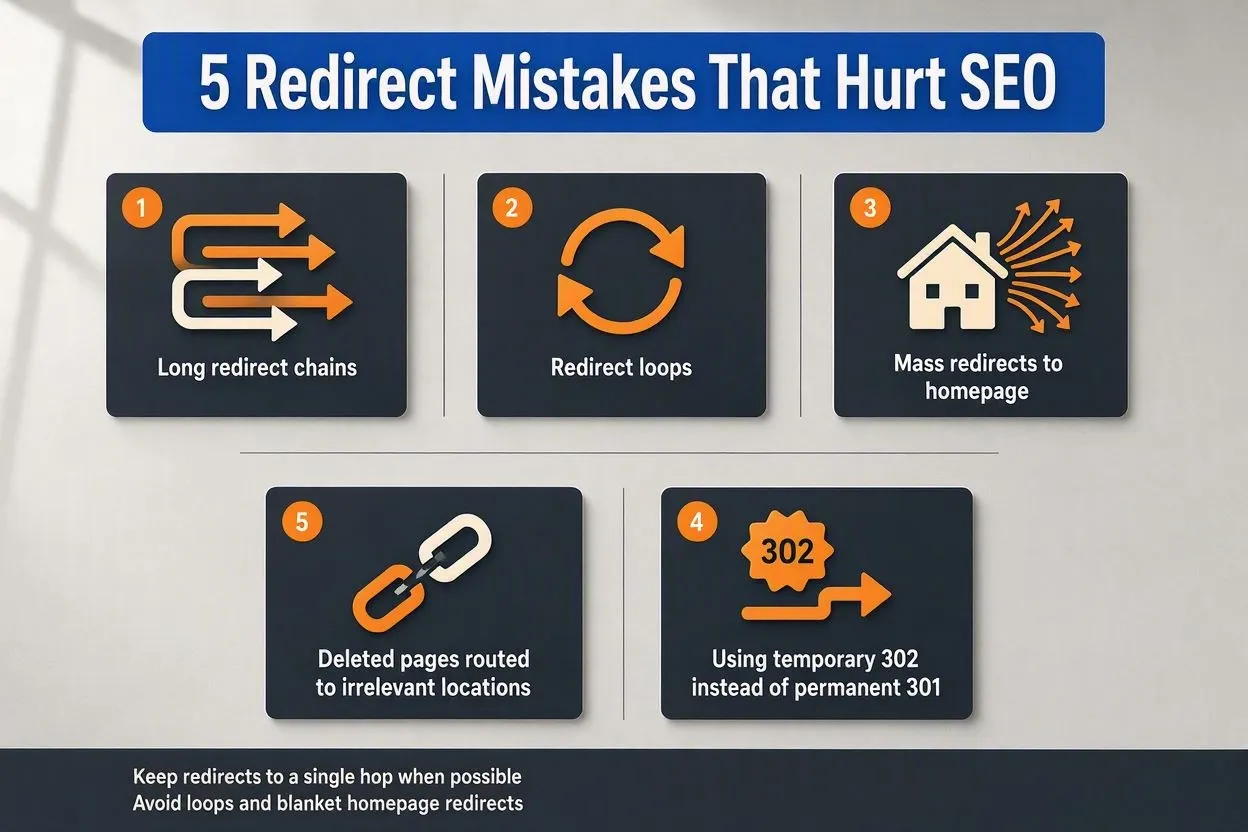
Redirect chains sneak up on sites over time. Page A points to B, B points to C, C points to D, and each hop adds load time while diluting whatever ranking signal is trying to pass through. Keep it under three hops, ideally just one.
Redirect loops are worse: A points to B, B points back to A, and browsers just throw an error since neither page ever actually loads. Mass redirects to the homepage are a subtler mistake. Send every deleted URL there and Google reads it as a soft 404, so none of the old page’s authority survives the trip.
Leaving 302s live indefinitely is its own trap. A “temporary” redirect that’s been up a year isn’t temporary, and eventually Google just starts treating it as permanent regardless of what you intended. And forgetting to update internal links after a redirect goes live means every click through your own site takes an unnecessary extra hop for no reason at all.
How Redirects Affect Page Speed
Each hop adds real, measurable load time, usually somewhere between 100 and 500 milliseconds depending on server response and how far away the server physically is. One redirect, you’ll never notice. Stack four or five and you’re adding over a second to load time, which drags down Largest Contentful Paint, one of Google’s Core Web Vitals.
On mobile it’s worse, since every extra network round trip costs proportionally more against total load time. A page that loads in 1.2 seconds direct can stretch to 2.8 seconds through three redirect hops on a mid-range 4G connection. Collapsing chains into single, direct redirects is one of those rare technical fixes that’s both easy and disproportionately worth doing.
How to Audit and Monitor Your Redirects
Google Search Console’s Page Indexing report is the first stop. Under Indexing, the Pages report flags any URL showing “Page with redirect,” plus errors like broken chains or oversized loops.
For anything site-wide, tools like Screaming Frog, Ahrefs Site Audit, or SE Ranking’s Website Audit crawl every internal link and surface 3xx codes across the whole domain, chains, loops, redirects still pointing at pages that don’t exist anymore. Run one of these at least quarterly, and always right after a migration or URL restructure. Left unchecked, redirect errors just quietly pile up.
Do Redirects Affect Visibility in AI Search?
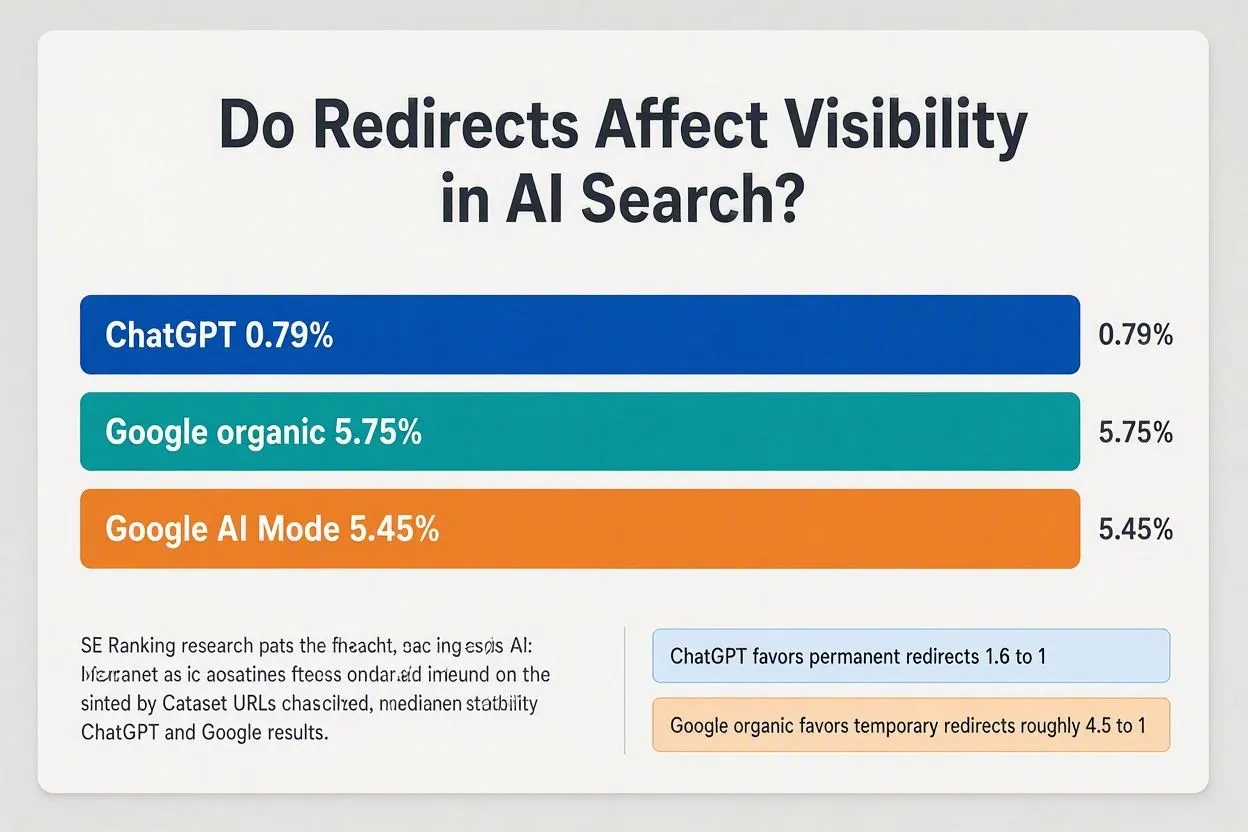
Yes, and more than most teams realize. SE Ranking’s research found only 0.79% of URLs cited by ChatGPT contained a redirect, versus 5.75% in Google’s organic results and 5.45% in Google’s AI Mode. ChatGPT also leaned toward permanent redirects over temporary ones by about 1.6 to 1, which is the reverse of what Google’s organic results show, where temporary redirects actually appear roughly 4.5 times more often.
So if AI-driven citations are part of your traffic mix, the calculus shifts a bit: minimize hops, and lean on 301s for anything genuinely permanent. Google’s own systems are far more forgiving of redirects in general, which means this trade-off starts to matter more the more your traffic leans on AI answers instead of classic search results.
Conclusion
This whole decision really comes down to intent, not technical preference. If the old URL isn’t coming back, a 301 protects the rankings and authority already built up. If the change is genuinely short-lived, a 302 keeps the original page’s standing intact while the temporary version does its job. Nail the intent, match the status code to it, and check back now and then to make sure some “temporary” redirect hasn’t quietly been live for a year without anyone noticing.