A competitor’s backlink profile tells you which sites trust them enough to link out, and that list is often the fastest route to your own next 50 link opportunities. Most SEO teams already suspect their rivals rank higher because of stronger links. Few actually pull the data and do something with it.
This guide covers how to check competitors’ backlinks with both paid SEO platforms and free workarounds, how to read the report once you have it, and which link-building metrics actually matter versus which ones just look good on a dashboard.
What Is a Competitor Backlink Analysis?
A competitor backlink analysis means identifying, evaluating, and comparing the external links pointing to a rival website against your own as part of a broader search engine optimization strategy. The goal is simple: find out who links to them, why those sites chose to link, and whether you can earn a similar (or better) link yourself.
Three things get compared in a typical analysis: total referring domains, the authority of those domains, and the anchor text used in the links. A site with 200 referring domains from niche publications will usually outperform a site with 2,000 links from low-quality directories. Quality carries more weight than raw count. Every major tool in this space, from Semrush to Majestic, builds its scoring around that idea.
That “authority” idea shows up under a few different names depending on which tool you use, so it’s worth knowing them before you start pulling reports:
- Domain Rating (DR): Ahrefs’ 0-100 logarithmic scale, based on the quantity and quality of referring domains linking to a site.
- Domain Authority (DA): A similar 0-100 scale, originally built by Moz, now used loosely across various third-party tools with differing methodologies.
- Authority Score: Semrush’s proprietary 0-100 metric, factoring in backlink quality, estimated organic traffic, and spam signals.
- Trust Flow and Citation Flow: Majestic’s paired metrics. Trust Flow estimates link quality based on proximity to trusted seed sites; Citation Flow estimates raw link quantity and influence.
A domain scoring 55 on Ahrefs’ DR and 55 on Semrush’s Authority Score isn’t necessarily equal in strength, since the underlying data sources and formulas differ. Use one tool’s score consistently for internal tracking, and treat cross-tool comparisons as directional rather than exact.
Why Check Competitors’ Backlinks?
Checking competitors’ backlinks matters because it shows you organic search ranking factors your own site is missing, and it does that faster than almost any other SEO research method. If two pages target the same keyword and one consistently outranks the other in the search results, the gap often traces back to link authority rather than content quality alone.
A few things drive most competitor backlink checks. You find link sources you don’t have yet: a competitor with 40 links from industry blogs has already proven those sites will link to content in your niche. You get a quick benchmark on authority, too. Comparing your domain rating (Ahrefs’ 0-100 score for link-based site strength) against three rivals shows exactly how far behind, or ahead, you are. And you start to notice which content formats actually earn links. Calculators, original data studies, and free tools show up disproportionately often, which tells you what to build next.
Here’s a realistic example of what that looks like in practice: a B2B software company checks a competitor’s blog and finds that a single 1,200-word comparison post has earned more referring domains on its own than the rest of the site combined. That kind of pattern only shows up once you check competitor backlinks directly. Guessing at a content calendar won’t get you there.
How to Check Competitors’ Backlinks in 6 Steps
Checking competitors’ backlinks takes six repeatable steps: pick an SEO tool, enter the domain, review the referring domains and authority scores, study the anchor text, filter for link quality, then export and compare. Each step below works whether you’re using a free checker or a full paid platform.
Step 1: Pick a Backlink Checking Tool
Start with a tool that has a large, frequently updated index. A small database will simply miss links. Semrush advertises a free checker built on tens of trillions of backlinks across hundreds of millions of referring domains, refreshed at least hourly. Ahrefs runs a competing crawler that it claims updates every 15 minutes and covers several hundred million domains. Majestic takes a different approach and keeps a historic index stretching back to 2006, which is useful if you want to see how a competitor’s link profile grew over several years rather than just its current snapshot.
Index sizes and refresh rates are numbers each vendor publishes about itself, and they change as the companies grow their crawlers, so treat any specific figure you see (including the ones above) as a snapshot to verify on the vendor’s own site rather than a fixed spec.
If your budget is zero, Seobility and SEO Review Tools both offer free checks with daily query limits. That’s fine for occasional spot-checks but not for ongoing monitoring.
Price and index size aren’t the only variables worth weighing. SEO Review Tools sources its backlink data through a third-party API rather than its own crawler, and that provider has reportedly changed more than once over the years (worth confirming on their site before you rely on it), which means today’s numbers could shift again if the underlying source changes. Majestic and Ahrefs, by contrast, run their own web crawlers end to end, which keeps their historical trend lines consistent over time. For a single competitor snapshot, none of this matters much. For tracking a rival’s link growth over 12 or 18 months, it matters a great deal.
Step 2: Enter the Competitor’s Domain
Type the competitor’s root domain into the tool’s search bar, not a single URL, unless you specifically want backlinks pointing to one page. Domain-level searches surface the full picture: every page on the site that has earned external links, not just the homepage.
Two domain formats behave differently across tools. Entering “example.com” typically pulls the entire domain including subdomains, while “www.example.com” or a full URL narrows the report to that exact path. Confirm which mode you’re in before drawing conclusions. A narrow search can make a competitor look weaker than it actually is.
Step 3: Review Referring Domains and Authority Metrics
The referring domains count and the domain-level authority score are the two numbers to check first, since together they show both the size and the strength of a competitor’s link profile. A domain with 5,000 total backlinks but only 80 referring domains has a concentrated, possibly repetitive link pattern. A domain with 500 backlinks spread across 480 referring domains looks broader and more organic.
Pull up three direct competitors side by side. Say your top rival shows 1,200 referring domains and an Authority Score of 62, while you’re sitting at 300 referring domains and a score of 38. That comparison does more than confirm a gap exists. It gives you a rough sense of how many link-building cycles stand between you and parity.
Step 4: Analyze Anchor Text Distribution
Anchor text distribution shows what words competitors’ backlinks use to describe their pages, which reveals what search terms and keywords other sites naturally associate with that content. Most SEO tools break this into a ranked list: branded terms, exact-match keywords, generic phrases like “click here,” and naked URLs.
A healthy, natural-looking anchor text profile leans branded and generic, typically 60% or more, with exact-match keyword anchors making up a smaller share. If a competitor’s anchor text is unusually heavy on exact-match commercial keywords, that’s often a sign of manipulated or purchased links rather than organic search visibility earned the normal way. Copying that pattern risks a Google penalty, not a ranking boost.
Step 5: Filter for High-Authority, Dofollow Links
Filtering for dofollow links from high-authority domains narrows a long backlink list down to the ones worth chasing. Nofollow links (marked with a rel=”nofollow” attribute) generally don’t pass ranking signal directly, though they can still drive referral traffic and brand visibility.
Set a minimum domain authority threshold, somewhere around 30 to 40 on most scoring scales, and filter out anything below it. That one filter can cut a 2,000-link report down to the 150 or so links actually worth manual review. That’s the difference between a two-hour analysis and a two-week one.
Step 6: Export the Data and Compare Multiple Competitors
Exporting the report to CSV or Excel lets you stack multiple competitors’ backlink data into one spreadsheet for side-by-side comparison. Semrush, Ahrefs, Majestic, Seobility, and SEO Review Tools all support CSV export, on free and paid tiers alike.
Run the same domain-level check across three to five direct competitors, then combine the exports into one sheet with columns for referring domain, authority score, anchor text, and link status (new or lost). Sites that link to multiple competitors but not to you are your highest-priority outreach targets. They’ve already shown they’re willing to link within your niche.
Free vs. Paid Backlink Tools Compared
| Tool | Free Tier Limit | Index Size | Standout Feature |
| Semrush | Limited backlinks per domain per day | 43 trillion backlinks, 390 million referring domains | Hourly refresh, detailed data-cleaning methodology |
| Ahrefs | Top 100 backlinks shown | 500 million domains tracked, 15-minute index updates | Domain Rating and URL Rating scoring |
| Majestic | Sample data on demo domains | Historic Index dating to 2006 | Clique Hunter for comparing up to 10 competitor domains at once |
| Seobility | Daily query cap | Not publicly disclosed | Link-building tactics built into the same page |
| SEO Review Tools | 100-150 backlinks per check | Runs on third-party APIs (currently Semrush) | Advanced search filters using wildcard and Boolean operators |
Paid tiers add full historical data, unlimited exports, and scheduled monitoring. For most small- to mid-size sites, a one-time competitor check works fine on the free tiers above.
How to Check Competitor Backlinks Without a Paid Tool

You can check competitor backlinks without paying for a tool, using Google Search Console combined with manual search operators. Search Console (Google’s free webmaster reporting platform) only shows backlinks to properties you own, so it’s useful for tracking your own links but not a rival’s. That’s exactly why the manual method matters here.
Two free tactics fill that gap. Google’s site: search operator won’t reveal backlinks directly, but combining site:competitor.com with a search for the competitor’s brand name across forums, review sites, and news outlets often surfaces unlinked or lightly linked mentions worth pursuing. You can also rotate the free-tier checkers: Semrush, Ahrefs, Seobility, and SEO Review Tools each cap free daily queries differently, so running the same competitor through all four in one sitting gives you a broader dataset than relying on just one.
Neither method matches a paid subscription’s depth, but together they’re enough to tell you whether a fuller competitor backlink audit is worth budgeting for.
Once you’ve got backlink data on a few competitors, whichever method you used to get it, the next move is turning that data into a target list. That’s what a gap report is for.
How to Read a Backlink Gap Report
A backlink gap report lists every domain that links to one or more competitors but not to your own site. Read one by sorting by domain authority rather than by link count. Most gap tools, Semrush’s Backlink Gap and Ahrefs’ Link Intersect among them, let you enter your domain plus up to five competitors and output a shared list.
Three columns matter most once the report loads. First: how many of the competitors does a given domain link to? A site linking to three of your four rivals but not you is a stronger signal than one linking to just one competitor. Second, the domain’s own authority score, since outreach to a high-authority site pays off more per link earned. Third, the linking page’s topic relevance. A general business directory carries less weight than a niche publication covering your exact industry.
This is the kind of result a gap report tends to surface: run the same report for a local services business against four competitors, and it’s common to find a couple dozen shared referring domains, often regional business associations and trade publications, that none of them are linking to yet. Targeted outreach to that list, sustained over a few weeks, typically converts a meaningful share of it into new links.
How Often Should You Check Competitors’ Backlinks?
Most sites do fine checking competitors’ backlinks once a quarter, though fast-moving industries with heavy digital PR activity often need a monthly check instead. A quarterly rhythm catches meaningful shifts in referring domain counts without burying trends in noise.
Monthly checks make more sense in specific situations. E-commerce brands running active influencer or affiliate campaigns can see referring domain counts jump by 50 or more in a single month, and catching that shift early tells you which campaign or content asset drove it. SaaS companies in crowded categories, where five or six rivals all publish comparison content and chase the same journalists, also tend to see faster link churn than a local service business would.
Set a recurring calendar reminder rather than relying on memory, and track the same three metrics each time: total referring domains, domain rating or authority score, and the count of new versus lost links since the last check. A spreadsheet with one row per competitor per quarter turns an occasional lookup into an actual trend line, and that’s what makes the data useful for forecasting rather than just describing where things stand right now.
Common Mistakes When Analyzing Competitor Backlinks
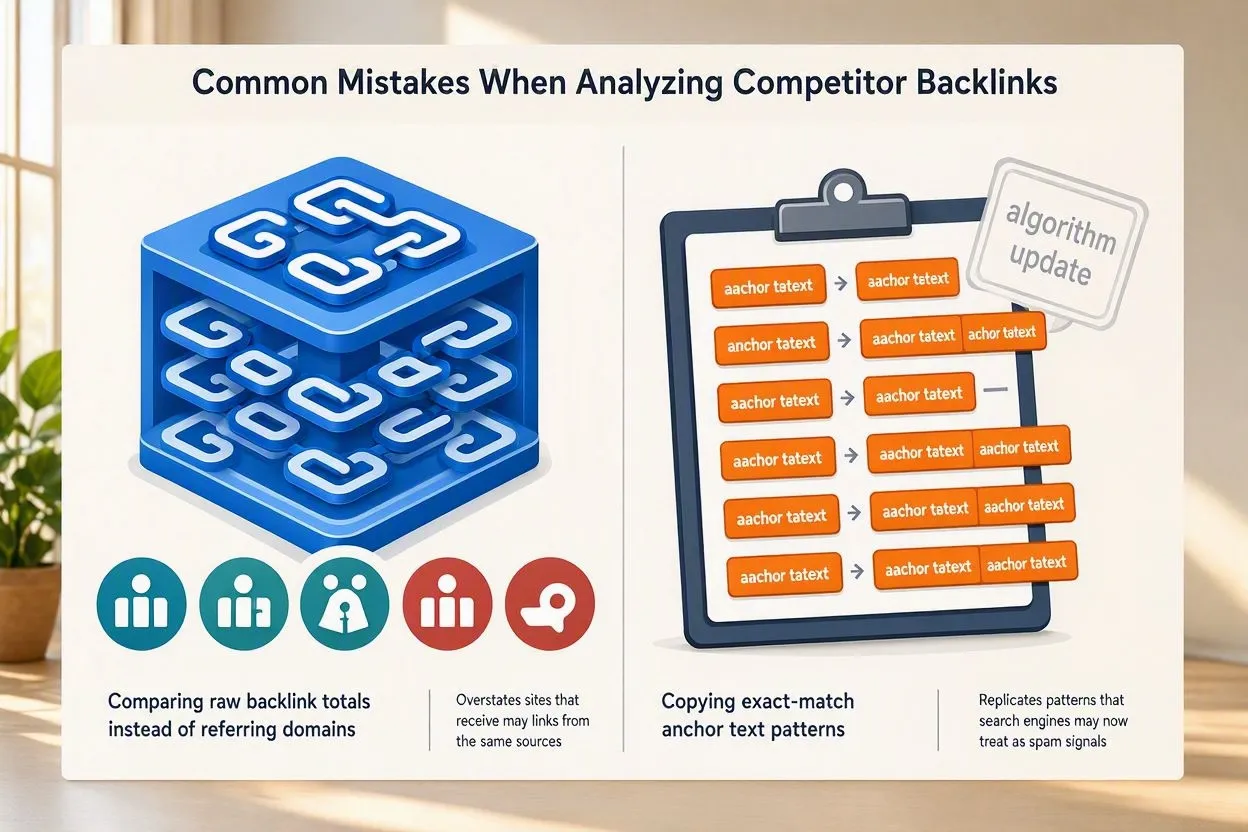
The most common mistake is comparing raw backlink totals instead of referring domains, which overstates the strength of sites with many links from the same few sources.
Copying a competitor’s exact-match anchor text pattern is another frequent misstep. If competitors’ backlinks lean heavily on commercial keyword anchors, that pattern likely predates a Google algorithm update that now treats it as a spam signal, not a strategy worth replicating under the current rules.
Ignoring link velocity is a mistake, too. A competitor jumping from 10 new referring domains a month to 200 in a single month is likely running a major PR campaign or buying links at scale, and that spike deserves scrutiny rather than imitation.
Writing off nofollow and sponsored links as worthless wastes real opportunity. Google’s 2019 update added rel=”sponsored” and rel=”ugc” alongside rel=”nofollow,” and Google has described these tags as hints it can weigh rather than rules it strictly follows (worth checking Google’s own Search Central documentation for the current wording, since guidance like this gets refined over time). A nofollow link from a high-traffic industry publication still sends referral traffic and builds brand exposure, even without passing full link equity.
Checking only one competitor is common too, especially among smaller teams, because a single link profile reflects just one strategy and one set of relationships. That makes it a weak baseline on its own. Checking three to five rivals at once, as outlined in Step 6, gives you a range of data instead of one snapshot, and that’s what actually shows whether your site sits ahead of, within, or behind the norm for your niche.
Conclusion
Checking competitors’ backlinks stops being a one-time research task once you treat it as a recurring input to SEO content strategy and link-building outreach planning. Set a quarterly cadence: pull fresh backlink data on three to five direct competitors, update the gap report, and prioritize the domains linking to multiple rivals but not you. The payoff compounds when you don’t stop at one outreach round. Rebuild the same gap report every quarter, and each cycle tends to turn up a fresh batch of referring domains worth chasing for your search engine optimization program.