
College is expensive. AI tools don’t have to be.
Most “best AI tools” lists push paid plans students don’t need. This guide covers 15 free AI tools for students — organized by what you actually do in school: write essays, solve math, find sources, take notes, and study for exams.
Every tool here works on a free plan. No credit card. No trial that auto-charges you on day 8.
What Makes a Student AI Tool Worth Using?
Before the list — three filters every tool passes here:

- Free tier works for real coursework — not just a 3-message demo
- Runs in a browser — no powerful laptop required
- Clear on academic integrity — you know what’s okay and what gets you flagged
With that set, here are the 15 tools worth your time.
The 15 Best Free AI Tools for Students (2026)
1. Google Gemini — Best Overall Free AI for Students
Best for: General studying, Google Docs work, document summaries
Google Gemini is the most generous free AI available to students right now. A basic Google account gets you access to Gemini 2.0 — unlimited text generation, summarization, brainstorming, and code help.
US students with a .edu email get an even better deal. The Gemini for Students plan includes Gemini 2.0 Pro, Deep Research, NotebookLM Plus, and 2TB of cloud storage — free for up to 12 months after verification through SheerID.
One warning: Set a calendar reminder for month 11. The plan auto-renews at $20/month. Thousands of students forget this every year.
Claim it at gemini.google/students.
Where it struggles: Gemini sometimes gives overconfident answers on niche academic topics. Always verify before citing.
2. ChatGPT — Best Free AI for Brainstorming and Outlines
Best for: Essay outlines, brainstorming angles, rewriting paragraphs
ChatGPT’s free tier includes file uploads, basic data analysis, and image generation. For most students, this is enough.
The problem is the message cap — roughly 10 messages every 5 hours before it drops to a weaker fallback model. Long study sessions hit this wall fast.
No student discount exists for ChatGPT Plus. Plus costs $20/month or $200/year. Try the free tier for a full month before spending anything.
ChatGPT works best when you give it a specific job. “Outline a 5-paragraph essay on the causes of World War I from a nationalist perspective” gets you something useful. “Write my essay” gets you something your professor will immediately flag.
3. Claude — Best Free AI for Essays and Long Readings
Best for: Essay feedback, summarizing 50-page readings, academic writing
Claude handles long documents better than any other free AI tool. Paste in a full research paper and ask for a breakdown by argument — Claude actually reads the whole thing.
For writing, Claude produces cleaner, more academic-sounding prose than ChatGPT. Students writing humanities papers, literature reviews, or analytical essays get better raw material here.
Important for US students: Several universities — including Northeastern and LSE — have campus-wide agreements giving students free Claude Pro access with higher limits. Check with your school’s IT or library department before paying for anything.
Where it fails: Math. Claude makes arithmetic errors on problems a basic calculator solves correctly. Never use Claude to check numerical work.
4. Perplexity AI — Best Free AI for Research Papers
Best for: Finding real sources, fact-checking, avoiding citation hallucination
Perplexity is a research-first tool. Every answer comes with inline citations linking to actual sources — not invented ones.
This matters because ChatGPT and Gemini both fabricate citations. A student pastes a “real-looking” reference into a paper, the professor checks it, the source doesn’t exist, and the student faces an academic integrity hearing. Perplexity prevents this.
The move most students miss: Switch Perplexity to Academic mode in settings. This filters results to peer-reviewed journals and academic databases. One toggle, dramatically better sources.
The free plan covers most assignment research. The Education Pro plan costs $10/month after student verification — only worth it once you’ve genuinely maxed out the free version.
5. Wolfram Alpha — Best Free AI for Math and Sciences
Best for: Calculus, physics, chemistry, statistics — any computation that needs a correct answer
Wolfram Alpha doesn’t predict answers. It computes them using real algorithms — the same engine behind Mathematica, which has been refined since 1988.
This is the only AI tool on this list that is reliably right about math. ChatGPT, Claude, and Gemini all make arithmetic mistakes. Wolfram does not.
The trade-off: Wolfram solves but doesn’t teach. Use it to verify your work, then use Claude or ChatGPT to understand why the answer is what it is.
Student discount: Wolfram Pro costs $7.50/month with verification through Student Beans or UNiDAYS. The free version covers most undergraduate coursework.
6. NotebookLM — Best Free AI for Studying Your Own Notes
Best for: Turning your lecture notes, PDFs, and slides into a study assistant
NotebookLM only knows what you upload. Feed it your professor’s slides, your textbook chapter, and your lecture notes — then ask it questions. Every answer comes from your material, not from the open internet.
This removes hallucination risk entirely for study sessions. The AI cannot make up facts your professor didn’t teach, because it only has access to your uploads.
Standout feature: The audio overview. NotebookLM generates a podcast-style summary of your uploaded material. Students who commute or work out while studying use this to cover content without sitting at a desk.
NotebookLM is fully free. The Plus version — included with the Gemini student plan — adds higher upload limits and more features.
7. Grammarly — Best Free AI for Writing Polish
Best for: Grammar, punctuation, clarity edits before submitting any written work
Grammarly runs in your browser and inside Google Docs. The free version catches grammar errors, awkward phrasing, and punctuation issues as you type.
It does not write your work. It fixes the boring mechanical errors so your actual ideas come through clearly.
Check this first: Many US universities provide Grammarly Premium for free through institutional licenses. Ask your writing center or check your school’s software portal before paying $12/month.
8. Canva — Best Free AI for Presentations
Best for: Slide decks, infographics, visual reports
Canva’s free tier includes 250,000+ templates. The Magic Studio feature turns a bullet-point outline into a slide deck in under two minutes.
Students with a .edu email may get Canva Pro free through Canva Campus — check canva.com/education before signing up with a personal email.
Canva doesn’t replace your ideas. It removes the 45-minute detour of building slides from scratch.
9. Quillbot — Best Free AI for Paraphrasing Academic Text
Best for: Rewriting dense academic text in simpler language, paraphrasing for comprehension
Quillbot paraphrases text in multiple modes — formal, simple, concise. For students reading difficult theoretical papers, pasting a confusing paragraph into Quillbot and choosing “simplify” gives a readable version in seconds.
Academic integrity note: Use Quillbot to understand text, not to disguise AI-generated writing as your own. Detection tools flag paraphrased AI output just as effectively as original AI output.
The free tier limits words per session — enough for understanding paragraphs, not rewriting full papers.
10. ChatPDF — Best Free AI for Reading Textbooks Fast
Best for: Extracting specific information from long PDFs without reading every page
Upload any PDF — textbook chapter, research paper, court ruling, scientific study — and ask ChatPDF specific questions. “What is the main argument of section 3?” “List the 4 factors the author identifies.” It returns precise answers with page citations.
The 2026 version supports multi-document cross-search — upload 3 sources and compare arguments across all 3 simultaneously.
Works best with text-based PDFs. Scanned documents with no embedded text return poor results.
11. Notion AI — Best Free AI for Organization and Planning
Best for: Semester planning, project tracking, converting messy notes into structured documents
Notion AI combines note-taking, task management, and AI summarization in one tool. Students use it to organize subjects, track assignment deadlines, and generate clean summaries from rough notes.
The AI features work inside the Notion workspace — highlight a block of messy notes and ask it to turn the notes into a structured outline. The result takes 5 seconds instead of 30 minutes.
Free tier limits AI queries per month — enough for regular use, not daily heavy lifting.
12. Consensus — Best Free AI for Scientific Research
Best for: Finding scientific evidence fast, understanding what research actually says on a topic
Consensus searches peer-reviewed papers and returns a “consensus meter” — showing whether studies on a topic mostly agree, mostly disagree, or show mixed results.
For students writing argumentative papers or literature reviews, this tool answers “what does the research actually say about X” faster than any database search.
Free plan covers most research needs. The premium tier adds full paper access and citation export.
13. Gamma AI — Best Free AI for Presentations (Alternative to Canva)
Best for: Building presentation decks fast from an outline or topic
Type a topic or paste an outline. Gamma builds a full slide deck with layout, visuals, and structure in under 60 seconds.
Students who need a presentation done fast — not a beautiful one, just a functional one — get more from Gamma than from Canva. Canva gives you control. Gamma gives you speed.
Free plan includes limited exports. For class presentations where you just need a PDF to show, the free version is enough.
14. Elicit — Best Free AI for Literature Reviews
Best for: Summarizing findings across multiple research papers simultaneously
Elicit finds research papers relevant to a topic and extracts key findings — methodology, sample size, conclusions — across multiple papers at once. For students writing literature reviews, this replaces 4 hours of database searching with 20 minutes of structured reading.
Free tier allows a set number of paper analyses per month. For students with 1–2 literature reviews per semester, the free plan is sufficient.
15. Otter.ai — Best Free AI for Lecture Notes
Best for: Recording and transcribing lectures automatically
Otter.ai records audio and produces a text transcript in real time. Students attend lecture, Otter transcribes, and the full notes are searchable afterward.
The free plan gives 300 transcription minutes per month — about 10 one-hour lectures. For students who struggle to write notes and listen simultaneously, this removes that conflict entirely.
Check your university’s recording policy before using this in class. Some professors prohibit audio recording. Ask first.
AI Tools by Subject — Which One to Open
Different subjects need different tools. Here’s the breakdown:
STEM students (Math, Physics, Chemistry, Engineering): Use Wolfram Alpha to compute, NotebookLM to study your notes, and Perplexity to find research sources. Avoid Claude and ChatGPT for any numerical work.
Humanities students (English, History, Philosophy, Political Science): Use Claude for essay writing and feedback, Perplexity with Academic mode for citations, and NotebookLM to organize course readings.
Business and Economics students: Use ChatGPT for case study brainstorming, Wolfram for financial calculations, Notion AI for project management, and Grammarly before every submission.
Pre-Med and Biology students: Use Consensus to understand current research, Wolfram for chemistry calculations, and NotebookLM to organize dense textbook content.
AI Tool Stack by Budget
$0/month — The zero-cost stack: Gemini (with .edu email) + NotebookLM + Perplexity + Wolfram Alpha + Grammarly + Canva
This stack covers 95% of what students need. Every tool is free. None requires a credit card.
$10/month — Add one paid upgrade: Add Perplexity Education Pro. Academic mode gets stronger, source quality improves, and the monthly query limit disappears. Worth it for students writing research-heavy papers every week.
$20/month — Maximum stack: Add Claude Pro or ChatGPT Plus only after genuinely hitting free tier limits on real coursework — not because someone on YouTube said the paid version is “way better.
Academic Integrity — What Actually Gets Students Flagged
This is the section most AI tool articles skip. Here are the 4 specific ways US students get caught:
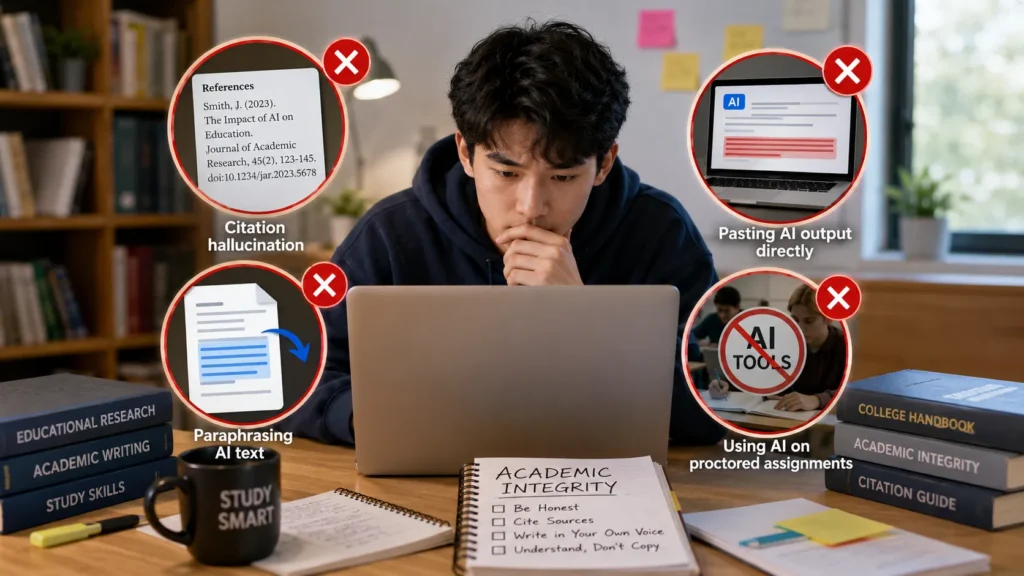
- Citation hallucination: ChatGPT invents sources that look real. Your professor checks. The paper doesn’t exist. Use Perplexity for all citations.
- Pasting AI output directly: AI detection tools — Turnitin, GPTZero — flag unedited AI text with high accuracy in 2026. Always rewrite AI-generated drafts in your own voice.
- Paraphrasing AI text: Paraphrasing AI output fools no one. Detection tools identify the structure, not just the words. Use AI to understand content, then write your own sentences.
- Using AI on proctored assignments: Some professors prohibit AI on specific assignments. Read every syllabus. When unclear, ask directly.
The safe use model: AI explains concepts and helps you understand material. You write the final sentences. Every citation comes from a source you personally verified.
The Free AI Tool Rotation That Actually Works
Running one tool for everything is why students hit paywalls and get frustrated. Here is a 6-step workflow using only free tools:

Step 1 — Research: Perplexity (Academic mode) → find 5–8 real, citable sources
Step 2 — Understand the material: NotebookLM → upload sources + lecture notes → ask questions, get quizzed
Step 3 — Write: Claude → outline, draft, get line-level feedback
Step 4 — Compute: Wolfram Alpha → verify every number before it goes in the paper
Step 5 — Polish: Grammarly → fix grammar and clarity
Step 6 — Present: Canva or Gamma → build slides from the finished outline
Total monthly cost: $0.
Final Word
The best free AI tools for students in 2026 are already better than most paid plans from two years ago. Gemini, Claude, Perplexity, Wolfram, and NotebookLM together cover every academic task — writing, research, math, note-taking, and exam prep — at zero cost.
The students pulling ahead aren’t paying more. They’re using the right tool for the right job and learning how to give it clear, specific instructions.
Start with the $0 stack. Add one paid tool only when you’ve genuinely hit a limit. Most students never do.