Think of a good XML sitemap as a map you hand to Google before it even asks for directions. It tells search engines which pages on your site actually matter, so they’re not stuck guessing based on your internal links. Here’s what an XML sitemap is, what one looks like, why it helps your SEO, and whether it does anything for AI search results too.
A few things worth knowing up front:
- An XML sitemap lists your site’s important URLs so search engines can find and crawl them faster.
- It’s not the only sitemap format out there. RSS feeds, Atom feeds, and plain text sitemaps all exist too, but XML is the standard for SEO.
- Sitemaps don’t guarantee indexing. They improve the odds of discovery, that’s it.
- Large sites need a sitemap index: a file that points to several individual sitemaps instead of listing URLs directly.
- Submit your sitemap to Google Search Console and you can track how many submitted URLs actually get indexed. That gap is usually where problems show up first.
What Is an XML Sitemap?
An XML sitemap is a file listing a website’s important pages so search engines can find and crawl them without relying purely on internal links. It also gives search engines a clearer read on your site’s structure and which content deserves priority.
XML isn’t the only sitemap format around. A few others exist, each built for a slightly different job:
- RSS, mRSS, and Atom feeds. These suit content that updates often, like blog posts or news articles, and automatically surface what’s new.
- Text sitemaps. The bare-bones option: a plain list of URLs, one per line, no extra metadata.
- HTML sitemaps. Built for human visitors, not crawlers. They link to key pages in a browsable structure that helps people navigate a large site.
XML sitemaps are the ones built specifically for search engines, and they carry more than just a list of links. Each entry can include:
- when a page was last meaningfully updated
- how a URL ranks in importance relative to other pages on the site
- whether the page contains images or video, using sitemap extensions
Search engines use that information to crawl a site more intelligently. This matters most when a site is large, brand new, or has a navigation structure that’s hard to follow.
What Does an XML Sitemap Look Like?
An XML sitemap is a plain text file written in XML, structured so search engines can parse it quickly and understand which URLs exist and when they last changed.
Here’s a simple example with a single URL:
- <?xml version=”1.0″ encoding=”UTF-8″?>
- <urlset xmlns=”http://www.sitemaps.org/schemas/sitemap/0.9″> <url
- <loc>https://www.example.com/</loc>
- <lastmod>2026-01-15</lastmod>
- </url> </urlset>
Each URL sits inside its own set of tags. Some are required, some are optional extras.
| Tag | Required? | Description |
| <?xml> | Yes | Declares the XML version and character encoding used in the file |
| <urlset> | Yes | Wraps the entire sitemap and defines the sitemap protocol |
| <url> | Yes | Represents one URL entry; every page gets its own <url> tag |
| <loc> | Yes | The full, canonical URL of the page |
| <lastmod> | No | The date the page was last meaningfully updated |
| <changefreq> | No | A suggested update frequency, like daily or weekly |
| <priority> | No | A relative importance score from 0.0 to 1.0 |
Google and Bing both ignore <changefreq> and <priority> these days. <lastmod> still gets used, but only when it’s accurate. A sitemap claiming every page updated today, when only two actually did, just teaches search engines to stop trusting the tag.
What Is an XML Sitemap Index?
A sitemap index is a file that points to several individual sitemaps instead of listing page URLs directly. It’s a directory of sitemaps, not a directory of pages.
This becomes necessary once a site has enough content that a single sitemap file can’t hold it all, or when it’s simply cleaner to split sitemaps by content type: one for blog posts, one for products, one for categories.
Here’s how a standard sitemap and a sitemap index differ:
| XML Sitemap | XML Sitemap Index | |
| Purpose | Lists individual page URLs | Lists multiple sitemap files |
| Content | Page URLs plus optional metadata | Links to other sitemaps |
| Best for | Small to mid-sized sites | Sites with more content than one file can hold |
| Structure | <urlset> and <url> tags | <sitemapindex> and <sitemap> tags |
Search engines cap individual sitemaps at 50,000 URLs or 50 MB, whichever comes first. Go past either limit and you need multiple sitemap files tied together with an index.
- <?xml version=”1.0″ encoding=”UTF-8″?>
- <sitemapindex xmlns=”http://www.sitemaps.org/schemas/sitemap/0.9″> <sitemap>
- <loc>https://www.example.com/sitemap-pages.xml</loc>
- <lastmod>2026-01-10</lastmod> </sitemap>/<sitemap
- <loc>https://www.example.com/sitemap-products.xml</loc>
- <lastmod>2026-01-10</lastmod>
- </sitemap> </sitemapindex>
In this example, the index points to two sitemaps, and each one can hold thousands of URLs on its own. Submit the index file to search engines and they’ll work through every sitemap it references.
Put simply: a sitemap helps search engines find pages. A sitemap index helps them find sitemaps.
Why Do You Need an XML Sitemap?
Technically, you don’t. Search engines can discover your pages through internal links and backlinks without any sitemap at all. But an XML sitemap makes that discovery faster and more reliable. The benefits stack up:
- Improved crawl efficiency. Listing your important URLs in one place makes it easier for crawlers to prioritize the pages that actually matter, instead of working through your site link by link.
- Faster indexing of new content. New pages get picked up sooner once they’re in the sitemap, which matters a lot for blogs, news sites, or stores with product lines that change weekly.
- Discovery of orphan pages. Pages nobody links to internally are easy for crawlers to miss. A sitemap gives them a way in regardless.
- Additional metadata signals. The <lastmod> tag tells search engines when a page changed and whether it’s due for a recrawl.
- Support for specialized content. Sitemaps can be extended for images and video, helping that content surface in Google Images or video search specifically.
- A clearer picture of site structure. A well-organized sitemap shows search engines how your site’s sections relate to each other.
- Indexing insights through Search Console. Once submitted, you can see exactly how many URLs got discovered versus indexed. That gap is often the first sign something’s wrong.
- Support for multilingual sites. Sitemaps can carry hreflang annotations pointing to alternate language versions of a page, so search engines serve the right version in the right region.
None of this guarantees indexing. Google’s been clear that a sitemap only improves the odds of a page getting found.
Do XML Sitemaps Matter for AI Search?

Yes, but indirectly. AI Overviews, Copilot, and similar tools still pull from the traditional search index, so a page generally has to be crawled and indexed the normal way before it can show up in an AI-generated answer.
That’s exactly where a sitemap still earns its keep. It speeds up discovery and indexing, and keeping <lastmod> accurate helps search engines prioritize pages that changed recently, which lines up well with how AI systems try to surface current information.
A sitemap won’t get your content pulled into an AI answer by itself. But it raises the odds your pages are discoverable, indexed, and current, and that’s still the groundwork every AI search system runs on.
How to Add an XML Sitemap to Your Site
Most content management systems generate a sitemap automatically, so manual creation only really makes sense for a handful of static pages that almost never change.
| Platform | Default Location | Setup |
| WordPress (built-in) | /wp-sitemap.xml | Automatic since version 5.5 |
| WordPress + an SEO plugin | /sitemap_index.xml | One-click install, updates in real time as you publish |
| Drupal | /sitemap.xml | Requires the XML Sitemap module |
| Joomla | /sitemap.xml | Requires an extension like OSMap |
| Shopify | Auto-generated | No setup required |
A good SEO plugin does more than generate the file once. It keeps the sitemap current as you publish, edit, or delete content, groups URLs into a sensible index by content type, and automatically leaves out anything marked noindex so the sitemap only contains pages meant to rank.
If you’re hand-coding a sitemap anyway, it’s five steps: create a file named sitemap.xml, add the XML declaration and namespace, wrap each canonical URL in <url> and <loc> tags, add <lastmod> only if you’ll actually keep it current, then upload the file to your site’s root directory. Past a few dozen pages, this stops being worth doing by hand.
Getting Google to find it
Add your sitemap’s URL to Google Search Console under the Sitemaps section of your verified property. Once it’s processed, Search Console shows submitted versus indexed counts side by side. A big gap between them, say 900 submitted against 640 indexed, is worth digging into. It usually points to thin content, duplicate pages, or a crawl error somewhere in the mix.
Two more things help: add a Sitemap: line to your robots.txt file pointing at the sitemap’s URL, and resubmit in Search Console after any major structural change to your site. Google recrawls submitted sitemaps on its own schedule, not instantly.
What Websites Need an XML Sitemap?
Google’s own documentation calls out sitemaps as useful for large sites, sites with big archives, newer sites with few external links, and sites built around rich media. Google’s position is that solid internal linking should let it find everything anyway, and in theory that’s true. In practice, a lot of sites don’t link their own content as cleanly as they think.
Honestly, every site benefits from having one. The web keeps getting bigger and harder to crawl efficiently, so giving search engines every reasonable way to find your content is rarely a bad call. A seven-page portfolio with tight internal linking won’t get much out of a sitemap. A three-week-old store with 200 products and no backlinks yet will get a lot out of one, since nothing else is pointing search engines toward it.
Which Pages Should Be in Your XML Sitemap?
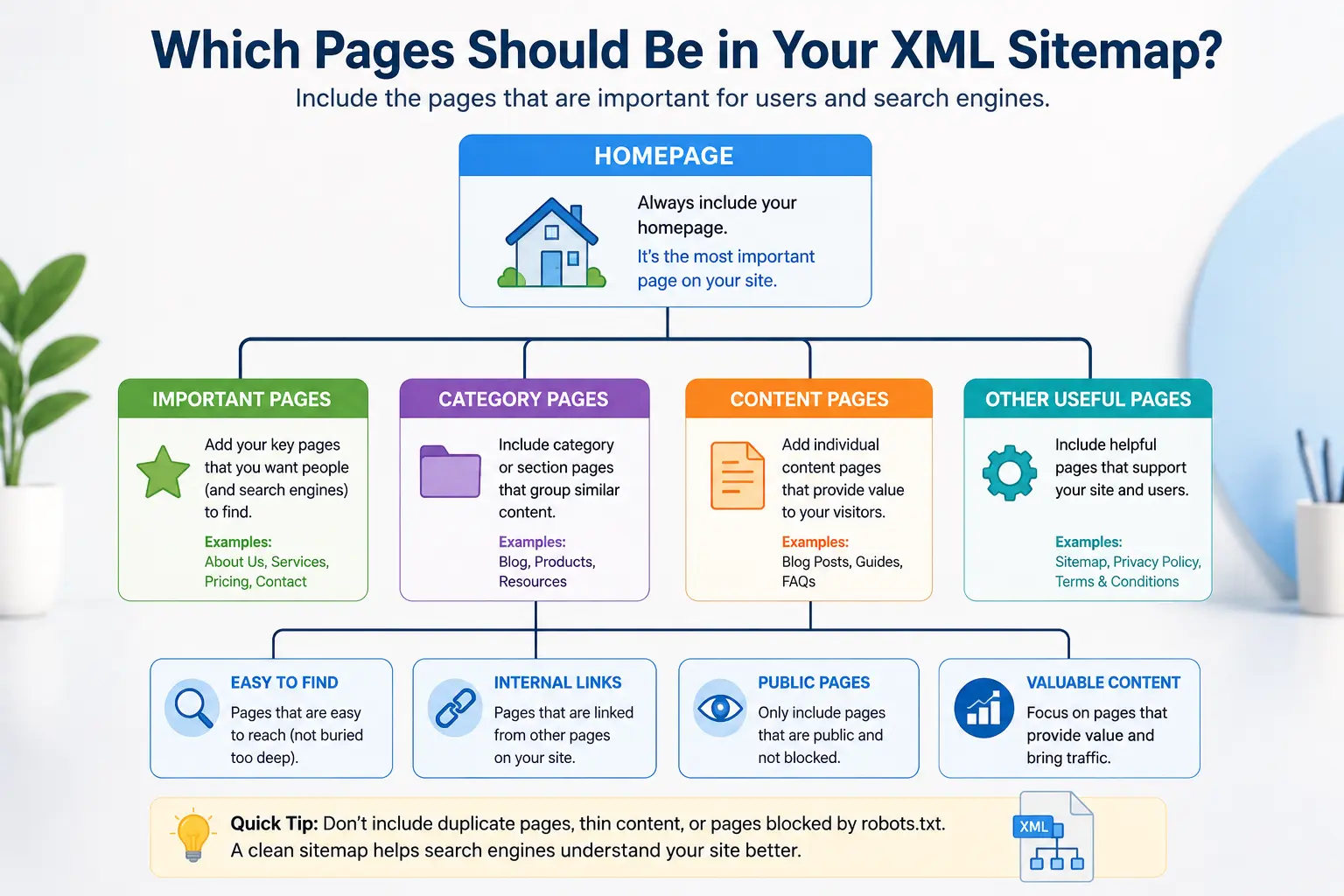
Start by asking one question about each URL: if someone landed here from a search result, would that be a good outcome? If not, it probably doesn’t belong in your sitemap. And if you don’t want a page to appear in search results at all, add a noindex tag to it directly. Leaving it out of the sitemap alone won’t stop Google from indexing it if it finds the page some other way.
Say you’re launching a new blog. You’ll want your posts in the sitemap right away since that’s the content you’re trying to get found. Most of your pages will be worth surfacing. A thank-you page that visitors see after subscribing to your newsletter isn’t one of them, and that’s the kind of page to leave out rather than excluding everything.
Category and tag archive pages are trickier. Early on, a tag page might list just one post, which isn’t much use to a visitor yet. It’s fine to exclude thin archive pages like that at launch and add them back in once they’ve got enough content to be worth a click. Some SEO plugins let you exclude whole page types in one setting. But don’t treat “thin” as permanent: a tag page can turn into a genuinely strong landing page once you build it out with real content, and at that point it belongs back in the sitemap.
Conclusion
An XML sitemap gives search engines a direct list of what to crawl instead of leaving discovery entirely to internal links and luck. List the right URLs, keep <lastmod> honest, and submit the file to Google Search Console, and you’ve done most of what a sitemap can actually do for you. Check your own sitemap against these basics and see where it stands.