

Most websites don’t rank. Not because the content is bad — but because basic steps are missing. No sitemap submitted. Title tags ignore the keyword. Pages Google can’t even crawl.
This SEO checklist covers 55 steps across 9 sections. Work through each section in order. If your site is already live, start from the technical audit section and fix what’s broken before adding new content.
1. Basic SEO Setup Checklist
Complete these 6 steps before anything else. Each one is a one-time task that takes less than a day total.
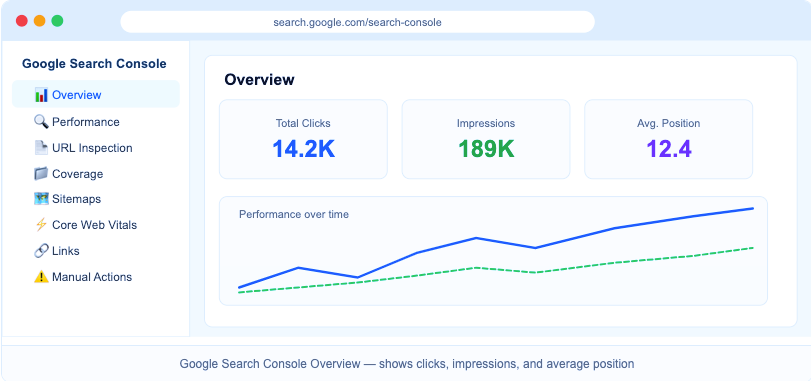
Step 1: Set up Google Search Console (GSC)
GSC shows which keywords your site ranks for, flags crawl errors, and lets you submit your sitemap. Verify your domain via DNS record or HTML file upload. After verification, submit your sitemap from the Sitemaps section.
Step 2: Set up Bing Webmaster Tools
Bing holds 6-8% of global search traffic. The fastest setup: import directly from GSC. The tool mirrors your sitemap and pulls verified site data automatically.
Step 3: Install Google Analytics 4 (GA4)
GA4 tracks organic traffic, session duration, and bounce rate. Connect GA4 to GSC for a combined view of traffic and keyword rankings inside one dashboard.
Step 4: Install an SEO Plugin
WordPress sites need Yoast SEO or Rank Math. Both auto-generate XML sitemaps, handle meta tags, manage 301 redirects, and add schema markup without manual coding. Shopify has built-in SEO fields — no plugin needed.
Step 5: Switch to HTTPS
Google confirmed HTTPS as a ranking signal in 2014. An SSL certificate is free through Let’s Encrypt. Most hosting providers activate it with one click from the control panel.
Step 6: Set a Canonical Domain
Choose either yourdomain.com and 301 redirect the other version. Mixed versions split link equity — Google treats both URLs as separate pages.
2. Technical SEO Checklist
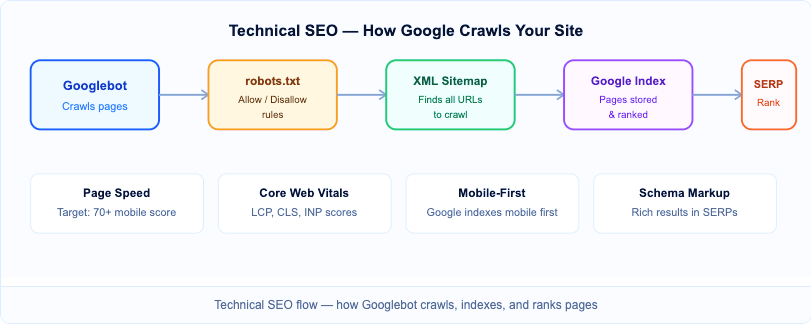
Technical SEO controls whether Google can find, crawl, and index your pages. Fix these 9 issues before publishing new content.
Step 1: Check Your Robots.txt File
Open yourdomain.com/robots.txt. Confirm the file doesn’t block Googlebot from crawling key pages. A line reading Disallow: / blocks the entire site — this is a common error after migrations.
Step 2: Create and Submit an XML Sitemap
A sitemap tells Google which pages exist and how often they update. WordPress plugins generate one automatically at yourdomain.com/sitemap.xml. Submit it in GSC under Sitemaps and resubmit after major content additions.
Step 3: Fix All Crawl Errors
Go to GSC > Coverage. Fix 404 errors using 301 redirects to the nearest relevant page. A 404 on a page with backlinks wastes all the link equity those backlinks pass.
Step 4: Pass Core Web Vitals (CWV)
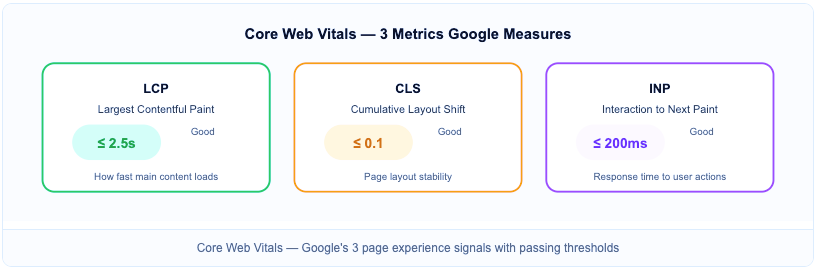
CWV measures 3 signals: LCP (Largest Contentful Paint) under 2.5s, CLS (Cumulative Layout Shift) below 0.1, and INP (Interaction to Next Paint) under 200ms. Check current scores in GSC > Experience > Core Web Vitals.
Step 5: Improve Page Speed
Run your homepage through PageSpeed Insights. Target a mobile score above 70. The 3 fastest fixes: compress images to WebP format, enable browser caching, and defer non-critical JavaScript.
Step 6: Test Mobile-First Indexing
Google indexes the mobile version of every page first. Open Google’s Mobile-Friendly Test and check 5-10 key pages. Fix any ‘not mobile-friendly’ errors — these directly reduce ranking potential on mobile searches.
Step 7: Add Canonical Tags to Duplicate Pages
Canonical tags tell Google which version of near-duplicate pages to index. E-commerce sites need this for product pages with color/size variants. Add <link rel=”canonical”> pointing to the primary URL.
Step 8: Add Schema Markup (Structured Data)
Schema markup helps Google display rich results. Add Article schema to blog posts, FAQ schema to Q&A sections, and Organization schema to your homepage. Use Google’s Rich Results Test to verify implementation.
Step 9: Clean Up URL Structure
Use short, descriptive URLs. Good: /seo-checklist. Bad: /?p=1234. On WordPress, change this under Settings > Permalinks > Post name. Don’t change URLs on existing pages — it breaks backlinks.
3. Keyword Research Checklist
Targeting wrong keywords wastes months of work. These 7 steps find terms people actually search, with competition you can realistically beat.
Step 1: Start With a Seed Keyword
A seed keyword is the broad topic your page covers. Type it into Ahrefs, Semrush, or Google Keyword Planner to see related terms, search volumes, and keyword difficulty (KD) scores.
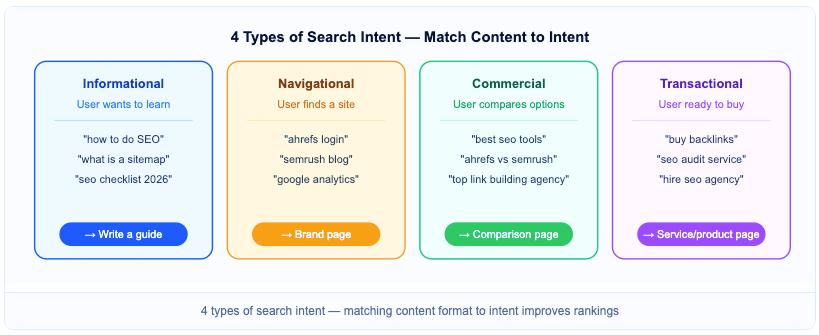
Step 2: Identify Search Intent
Every keyword has 1 of 4 intents: informational, navigational, commercial, or transactional. Match your content format to the intent. An informational keyword needs a guide, not a product page.
Step 3: Check Keyword Difficulty Before Targeting
KD scores below 30 work for low-authority sites. KD above 60 requires strong backlink profiles and topical authority. Don’t target high-KD keywords on a new site.
Step 4: Find Long-Tail Keyword Variations
Long-tail keywords have 3+ words. They get less traffic but face less competition and convert better. Target 3-5 long-tail variations per page alongside the primary keyword.
Step 5: Check SERP Features
Search your target keyword and note whether it shows featured snippets, People Also Ask, video results, or local packs. Format your content to compete for visible SERP positions beyond standard blue links.
Step 6: Analyze the Top 3 Ranking Pages
Check word count, heading structure, and content depth of the top 3 results. Your page needs to match or exceed their depth. Don’t just count words — check which topics they cover that you haven’t.
Step 7: Cluster Related Keywords Under One Page
“SEO checklist 2026”, “complete SEO checklist”, and “SEO audit checklist” all belong on the same page. Splitting them across separate pages causes keyword cannibalization.
4. On-Page SEO Checklist
Apply these 10 steps to every page before publishing. On-page SEO optimizes individual pages for target keywords.
Step 1: Write a Focused Title Tag
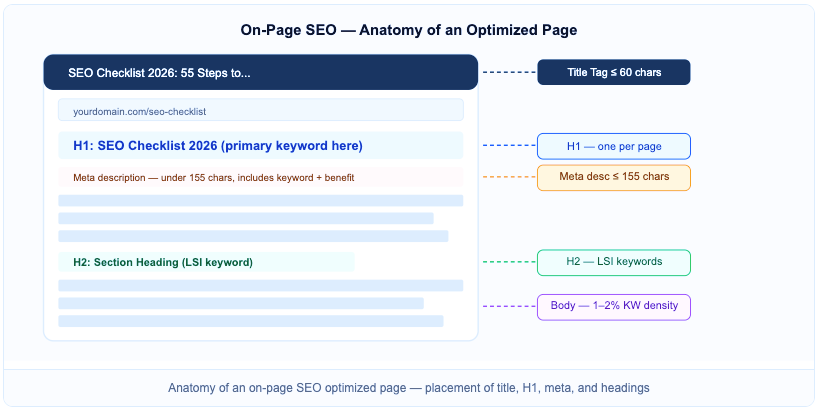
Keep title tags under 60 characters. Place the primary keyword near the beginning. Numbers increase CTR — “SEO Checklist 2026: 55 Steps” outperforms “A Guide to SEO”.
Step 2: Write a Meta Description That Earns the Click
Keep under 155 characters. Include the primary keyword and state a specific benefit. Meta descriptions don’t directly affect rankings, but they control click-through rate (CTR).
Step 3: Use One H1 Tag Per Page
Every page gets exactly one H1. The H1 must include the primary keyword. It doesn’t need to be identical to the title tag, but both should clearly match the page topic.
Step 4: Structure Content With H2 and H3 Tags
H2 tags divide main sections. H3 tags break down sub-points. Weave secondary keywords and LSI terms naturally into headings — don’t force them.
Step 5: Place the Primary Keyword in the First 100 Words
Google weighs introductions heavily when determining relevance. Place the keyword naturally within the first 2 paragraphs — not in the first sentence if it reads unnaturally.
Step 6: Write Descriptive Image Alt Text
Alt text describes images for Google and screen readers. Include the target keyword in the main image alt text. Write plain descriptions for all other images.
Step 7: Add 3-5 Internal Links Per Page
Internal links pass link equity between pages and help Google discover content. Use descriptive anchor text. Link from high-traffic pages to pages that need ranking boosts.
Step 8: Add 2-3 External Links to Authoritative Sources
Linking to credible external sources signals that the page is well-researched. Link to official documentation, research studies, or recognized publications.
Step 9: Keep Keyword Density Natural
Aim for 1-2% keyword density. In a 2,000-word article, the primary keyword appears roughly 20-40 times. Over-repetition triggers spam filters.
Step 10: Optimize for Featured Snippets
Answer questions in 40-60 word paragraphs, use numbered lists for processes, and use tables for comparisons. The People Also Ask section shows exactly which questions Google wants answered on your topic.
5. Content SEO Checklist
Content quality drives rankings more than any other factor in 2026. Google’s Helpful Content System (HCS) actively demotes thin or low-effort pages.
| Content Factor | What Google Checks | How to Fix |
| E-E-A-T | Author credentials, citations, real experience | Add named author bio, cite primary sources |
| Search Intent Match | Does content format match query type? | Guide for informational, product page for transactional |
| Content Freshness | Last updated date, fresh statistics | Update every 6-12 months, add new sections |
| Semantic Coverage | Related entities and NLP terms present? | Include GSC, sitemap, canonical, CWV naturally |
| Content Depth | Are all subtopics covered? | Use Ahrefs Content Gap to find missing topics |
Step 1: Match Content Depth to Search Intent
Informational queries need thorough guides. Transactional queries need concise, direct answers. A 4,000-word article for a transactional keyword often ranks below a focused 800-word page.
Step 2: Demonstrate E-E-A-T
E-E-A-T stands for Experience, Expertise, Authoritativeness, and Trustworthiness. Add a named author bio with credentials. Cite primary sources. Include original data or case study examples.
Step 3: Update Existing Content Every 6-12 Months
Replace outdated statistics, update screenshots, add new sections covering topics competitors recently published. Add the updated date to the article header.
Step 4: Use Semantic Entities and Related Terms
For an SEO checklist, entities like Google Search Console, XML sitemap, canonical tag, Core Web Vitals, and domain authority should appear naturally. Their presence confirms topical coverage to Google’s NLP systems.
Step 5: Fill Content Gaps
Use Ahrefs Content Gap or Semrush Keyword Gap to find keywords competitors rank for that your site doesn’t cover. These gaps represent pages or sections you haven’t written yet.
Step 6: Use Structured Content Formats
Tables, numbered lists, and comparison blocks improve readability and increase chances of winning featured snippet positions. Short paragraphs — 2 to 4 sentences each — reduce bounce rate.
6. Link Building Checklist
Backlinks remain one of Google’s top 3 ranking signals. These 7 steps build a clean, authoritative backlink profile.
Step 1: Audit Your Existing Backlink Profile
Use Ahrefs Site Explorer or Semrush Backlink Analytics. Check Domain Rating (DR) of linking sites, spam scores, and anchor text distribution. Disavow toxic backlinks — sites with spam scores above 60% — using GSC’s Disavow Tool.
Step 2: Analyze Competitor Backlinks
Export backlink lists of the top 3 ranking competitors for your target keyword. Target the same sources. If a site links to a competitor on the same topic, it may link to yours too.
Step 3: Target Relevant Sites With DR Above 40
Prioritize sites in your exact niche over generic high-DA sites. A DR 45 site in your niche passes more relevant authority than a DR 80 site with no topical connection.
Step 4: Diversify Anchor Text Across Campaigns
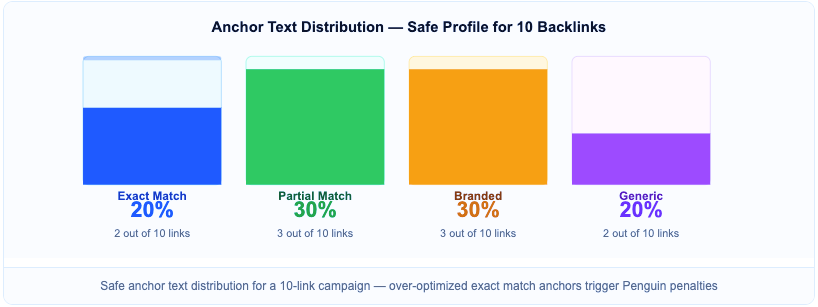
Across any 10-link campaign: 2 exact match, 3 partial match, 3 branded, 2 generic. Map this distribution before writing the first post.
Step 5: Use Broken Link Building
Find pages in your niche with broken outbound links using Ahrefs or Check My Links Chrome extension. Create a page covering the same topic and suggest yours as a replacement. Conversion rates typically run 5-10%.
Step 6: Create Linkable Assets
Original studies, free tools, and detailed guides earn editorial backlinks without outreach. A single data-driven study can generate dozens of natural citations if it covers something unpublished.
Step 7: Track Link Indexing Monthly
A backlink only passes authority after Google indexes the linking page. Check new links monthly in Ahrefs. Unindexed guest posts pass zero authority regardless of the site’s DR.
7. Guest Post Checklist
Generic SEO checklists skip this section. Guest posting is one of the most effective link building methods — but bad guest posts on low-quality sites trigger manual penalties.
⚠️ Important: Build a qualified prospect list of 50+ sites before starting outreach. Quality filtering upfront takes 2-3 hours but saves days of writing for sites that reject pitches or pass no link equity.
Step 1: Qualify Every Target Site Across 5 Metrics
Check: DR minimum 40, monthly organic traffic minimum 1,000 visits (verify in Ahrefs or Semrush), spam score below 3% in Moz, niche relevance, and last published date within 60 days. Reject sites failing 2 or more checks.
Step 2: Read 3-5 Recent Articles on the Target Site
Low-quality or clearly AI-generated content signals a link farm — even if DR looks acceptable. Guest posts on penalized sites actively harm your backlink profile.
Step 3: Confirm Dofollow Link Policy Before Writing
Some sites add nofollow or sponsored tags to all outbound links. These pass no link equity. Confirm link type in your outreach email before writing a single word.
Step 4: Place 1 Contextual Backlink Per 500 Words
One backlink per guest post is the standard safe ratio. 3-4 links in a single article looks unnatural and reduces publication chances. The link should appear where it naturally adds context.
Step 5: Track Guest Post Indexing Within 30 Days
Use GSC URL Inspection on each published post after 2 weeks. If not indexed, contact the site owner to request internal links to the post. Unindexed guest posts pass zero authority.
8. Off-Page SEO Checklist
Step 1: Build NAP Citations for Local SEO
NAP stands for Name, Address, Phone. Keep these identical across Google Business Profile, Bing Places, Yelp, and industry directories. Inconsistent NAP data suppresses local pack rankings.
Step 2: Track and Claim Unlinked Brand Mentions
Set up Google Alerts or Ahrefs Alerts for your brand name. When a site mentions your brand without linking, reach out and request a backlink. These convert at higher rates than cold outreach.
Step 3: Share Content on Relevant Platforms
LinkedIn, Twitter/X, and niche forums generate referral traffic and social signals. Social signals don’t directly affect Google rankings but reduce reliance on a single organic channel.
Step 4: Respond to Reviews Within 48 Hours
Google Business Profile review volume and average rating influence local pack rankings. Responding to negative reviews professionally protects both brand perception and local search visibility.
9. Monthly SEO Audit Checklist
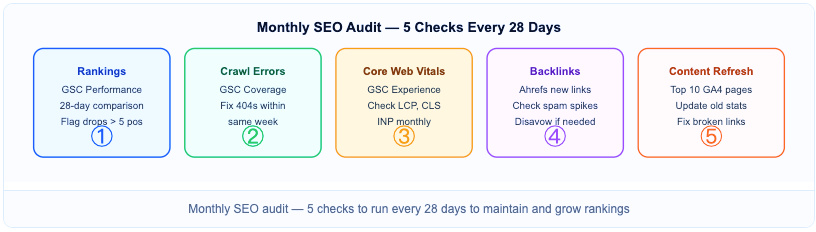
Most Sheffield SEO guides stop at setup. Ongoing monitoring separates growing sites from ones that plateau. These 5 checks take under 2 hours combined — run them every month.
Step 1: Review Ranking Changes in GSC
Open GSC > Performance > Search results. Set the date range to last 28 days vs previous 28 days. Flag any keyword that dropped more than 5 positions. Check Google’s Search Status Dashboard for algorithm updates on those dates.
Step 2: Fix New Crawl Errors Immediately
404 errors accumulate constantly, especially on sites that publish frequently. Check GSC > Indexing > Pages monthly. Fix new 404s within the same week — each day a page with backlinks returns a 404 wastes link equity.
Step 3: Check Core Web Vitals Scores
CWV scores change after theme updates and plugin installations. A drop in LCP after a theme update usually points to unoptimized hero images or render-blocking scripts added by the new theme.
Step 4: Review New and Lost Backlinks
A sudden spike of 50+ low-quality backlinks in one week can indicate a negative SEO attack. If this happens, file a disavow request in GSC immediately. Also check lost backlinks — a site may have removed your link during a redesign.
Step 5: Update Top Pages With Fresh Data
Identify top 10 traffic pages in GA4. Check each for outdated statistics, broken outbound links, and missing topics competitors have published since your last update.