Managing social media without AI in 2026 is like driving without GPS — you’ll get somewhere, but you’ll waste a lot of time figuring out the route.
The average social media manager spends 6 hours per day on content creation, scheduling, and reporting. That’s 42 hours a week on tasks that AI handles in minutes. Brands using AI tools for social media marketing report a 40% drop in manual workload and a 3x faster content output, according to HubSpot’s 2025 marketing report.
This guide covers 12 AI tools that are actually worth your money in 2026. Each tool was selected based on 4 factors: real user reviews, pricing value, feature depth, and whether a free plan exists. No filler tools. No vague recommendations.
Whether you run a startup Instagram page or manage social accounts for 10 clients, you’ll find the right tool here.
What Do AI Tools Actually Do for Social Media?
AI tools handle 3 core social media jobs: content creation, scheduling, and audience intelligence. Here’s what that looks like in practice.
Content Creation
AI writes captions, generates hashtags, drafts ad copy, and even creates images — all from a short text prompt. Tools like Jasper AI and Copy.ai produce 10 caption variations in under 30 seconds. That’s content your team would spend 2 hours writing manually.
The quality gap between AI-generated and human-written content has shrunk dramatically. Today’s AI tools match your brand voice, follow your tone guidelines, and produce copy that reads naturally. The key is giving the tool specific instructions — vague prompts get vague results.
Scheduling and Automation
AI scheduling tools analyze your audience’s activity patterns and find the exact time when your followers are most likely to engage. Buffer’s AI, for example, studies 90 days of your past post performance and recommends posting windows with the highest predicted engagement rate.
Beyond timing, these tools auto-publish across Instagram, LinkedIn, TikTok, Facebook, and X simultaneously — saving you 3–5 hours of manual posting per week.
Social Listening and Sentiment Analysis
This is where AI separates itself from basic scheduling tools. Social listening AI (used in tools like Brandwatch and Sprout Social) scans millions of online conversations in real time. It tracks brand mentions, detects sentiment shifts, and alerts you before a PR problem grows.
One example: a brand notices a spike in negative mentions on a Tuesday morning. Without AI, that story spreads for 48 hours before someone catches it. With Brandwatch’s real-time monitoring, the team responds within the hour.
How We Picked These 12 Tools
Every tool on this list meets 5 criteria:
- Actively maintained — updated within the last 6 months
- Real AI features — not just a “smart” label on basic automation
- Transparent pricing — no hidden fees or confusing tiers
- Free plan or trial available — so you can test before paying
- Verified by user reviews — minimum 4.2/5 stars on G2 or Capterra
12 Best AI Tools for Social Media Marketing in 2026
1. Hootsuite — Best for All-in-One Social Media Management
Hootsuite is the strongest all-in-one AI platform for teams managing 5+ social accounts. Starting at $99/month, it combines scheduling, analytics, social listening, and AI content generation in a single dashboard.
Hootsuite’s OwlyWriter AI writes captions and post ideas based on your brand voice and goals. Enter a topic, select your tone, and OwlyWriter produces 5 ready-to-publish caption options in seconds. The built-in “Best Time to Post” feature analyzes 30 days of your audience data and identifies 3 daily windows with the highest predicted engagement.
Best features:
- OwlyWriter AI for caption and hashtag generation
- AI-powered best time to post recommendations
- Built-in Canva integration for visual content
- Real-time social listening across 8 platforms
Pricing: Starts at $99/month | Free trial: 30 days Best for: Marketing agencies, enterprise teams, brands managing multiple platforms
One real limitation: Hootsuite’s analytics dashboard has a steep learning curve. New users typically need 2–3 weeks to get comfortable with the reporting features.
2. Buffer — Best for Small Teams and Startups
Buffer is the cleanest, most affordable AI scheduling tool for teams under 10 people. At $5/month per channel, Buffer gives small businesses access to AI-powered scheduling without the enterprise price tag.
Buffer’s AI assistant studies your past 90 days of post performance and suggests optimal posting times for each platform separately. An Instagram post and a LinkedIn post from the same brand often perform best at completely different times — Buffer accounts for that automatically.
The content suggestions feature scans trending topics in your niche and recommends 3–5 post ideas daily. This removes the biggest time drain for small teams: figuring out what to post next.
Best features:
- AI optimal posting time suggestions per platform
- Content idea generator based on trending topics
- Clean, beginner-friendly dashboard
- Supports Instagram, LinkedIn, Facebook, X, TikTok, Pinterest
Pricing: Free plan available | Paid plans from $5/month per channel Best for: Solopreneurs, startups, small business owners
3. Jasper AI — Best for AI Content Creation
Jasper AI produces the highest-quality social media copy of any AI writing tool in 2026. At $39/month, Jasper gives you access to 50+ content templates built specifically for social media, including Instagram captions, LinkedIn posts, Twitter threads, and ad copy.
What sets Jasper apart from basic AI writers is its Brand Voice feature. Feed Jasper 3 samples of your existing content, and the tool learns your tone, vocabulary, and style. Every piece of content it generates after that matches your brand — not a generic AI voice.
Jasper also handles content repurposing well. Paste a 1,000-word blog post, and Jasper breaks it into 5 platform-specific social posts in under 60 seconds. This alone saves content teams 4–6 hours per week.
Best features:
- Brand Voice training from existing content samples
- 50+ social media content templates
- Content repurposing from long-form to social posts
- Supports 25+ languages for global brands
Pricing: Starts at $39/month | Free trial: 7 days Best for: Content marketers, copywriters, brands with strong brand voice guidelines
4. Copy.ai — Best for Caption Writing on a Budget
Copy.ai writes the best short-form social media captions at the lowest price point — free for up to 2,000 words/month. For teams focused primarily on Instagram, TikTok, and X, Copy.ai covers 90% of daily content needs without costing a dollar.
The tool’s social media caption generator works in 3 steps: enter your product or topic, choose your tone (funny, professional, casual, bold), and pick from 10 generated options. Most users find 2–3 usable captions in every batch, which means less editing and faster publishing.
Copy.ai also generates A/B testing variations automatically. Instead of writing one caption and guessing whether it will perform, you get 2 versions optimized for different audience segments — a significant advantage for brands running paid social campaigns.
Best features:
- Free plan with 2,000 words/month
- Caption generator with tone selection
- Automatic A/B testing variation generator
- Hashtag suggestion tool
Pricing: Free plan available | Paid from $36/month Best for: Startups, freelancers, businesses running paid social campaigns
5. Canva AI — Best for Visual Content Creation
Canva AI creates professional social media visuals in under 5 minutes, no design experience needed. The Magic Studio suite includes text-to-image generation, background removal, AI image editing, and a brand voice copy generator — all inside Canva’s familiar drag-and-drop interface.
The Magic Write feature generates on-brand captions directly inside your design canvas. You design the visual and write the caption in the same tool, which cuts the back-and-forth between Canva and a separate AI writer.
For teams managing content across multiple platforms, Canva’s Magic Resize feature automatically reformats one design into 12 platform-specific sizes — Instagram square, Instagram story, LinkedIn banner, Facebook cover — in one click. That’s 45 minutes of manual resizing reduced to 10 seconds.
Best features:
- Text-to-image AI generation
- Magic Resize for multi-platform publishing
- Magic Write for in-canvas caption creation
- Brand Kit for consistent visual identity
Pricing: Free plan available | Pro plan at $12.99/month Best for: Small businesses, content creators, social media managers without design skills
6. Sprout Social — Best for Analytics and Social Listening
Sprout Social delivers the most detailed AI-powered analytics of any social media tool, starting at $249/month. The price is high, but enterprise teams and agencies with 10+ clients recover that cost in saved reporting hours within the first month.
Sprout’s AI sentiment analysis reads every brand mention across social platforms and scores each conversation as positive, negative, or neutral. The Smart Inbox feature consolidates all comments, DMs, and mentions from every platform into one feed — and flags messages that need urgent responses based on sentiment score.
The reporting suite generates automated weekly and monthly performance reports with zero manual input. The report covers engagement rate, reach, follower growth, posting frequency, and top-performing content for every platform. Agency teams typically spend 8–10 hours per month building these reports manually. Sprout eliminates that entirely.
Best features:
- AI sentiment analysis across all platforms
- Smart Inbox with urgency flagging
- Automated performance report generation
- Competitor benchmarking with AI insights
Pricing: Starts at $249/month | Free trial: 30 days Best for: Agencies, enterprise brands, social media teams managing 5+ accounts
7. Predis.ai — Best Free AI Social Media Tool
Predis.ai is the best free AI tool for social media content creation — the free plan generates 15 posts per month with no credit card required. For solo creators and small businesses testing AI for the first time, Predis.ai removes every barrier to entry.
The tool takes a single text prompt and generates a complete social media post: image, caption, and hashtags together. Competitors like Canva and Jasper handle these separately. Predis.ai packages them as one output, which cuts content creation time by 70% for visual posts.
The AI video creator feature (available on paid plans from $29/month) turns product images into short video ads — a format that generates 3x more engagement than static posts on Instagram and TikTok.
Best features:
- Free plan: 15 AI-generated posts/month
- All-in-one post generator (image + caption + hashtags)
- AI video creator from product images
- Competitor post analysis
Pricing: Free plan available | Paid from $29/month Best for: Solo creators, small businesses, anyone new to AI social media tools
8. FeedHive — Best for Engagement Prediction
FeedHive predicts how a post will perform before you publish it — no other tool at this price point ($19/month) offers this feature. The AI Performance Score analyzes your historical engagement data and scores each scheduled post from 1–10. Posts scoring below 6 get flagged with improvement suggestions.
This changes how social media teams make decisions. Instead of publishing and hoping, you publish posts that data says will perform. FeedHive users report a 35% average increase in engagement rate within 60 days of using the performance prediction feature.
The content recycling automation feature resurfaces your top-performing posts every 3–6 months to new followers who missed them the first time. For accounts with 12+ months of content history, this feature alone generates 20–30% of monthly impressions without creating any new content.
Best features:
- AI Performance Score before publishing
- Content recycling automation
- Hashtag performance tracker
- Conditional posting (publish only if conditions are met)
Pricing: Free plan available | Paid from $19/month Best for: Content-heavy brands, accounts with 6+ months of post history
9. SocialBee — Best for Content Scheduling and Organization
SocialBee organizes your entire content calendar with category-based AI scheduling — starting at $29/month. Most scheduling tools treat all posts the same. SocialBee sorts content into categories (educational, promotional, entertaining, curated) and automatically balances your posting mix across each category.
This matters because brands that mix content types see 47% higher engagement than brands that only post promotional content. SocialBee enforces that mix automatically so your audience never feels like they’re being sold to constantly.
The AI caption generator writes platform-specific variations of each post. The same core message gets written differently for LinkedIn (professional tone, longer copy) versus Instagram (casual, emoji-friendly, shorter). One piece of content becomes 4 platform-optimized posts in 30 seconds.
Best features:
- Category-based content scheduling
- AI platform-specific caption variations
- RSS feed import for content curation
- Evergreen content queue
Pricing: Starts at $29/month | Free trial: 14 days Best for: Coaches, consultants, e-commerce brands, content-heavy businesses
10. Brandwatch — Best for Social Listening and Brand Monitoring
Brandwatch monitors 100 million+ online sources in real time and gives brands the clearest picture of their audience sentiment — custom pricing, typically $1,000+/month. This is an enterprise tool built for brands where a single PR crisis costs more than an annual Brandwatch subscription.
The AI-powered consumer intelligence platform goes beyond tracking mentions. Brandwatch identifies which audience segments talk about your brand, what language they use, and what topics they care about most. This data feeds directly into content strategy, advertising targeting, and product development decisions.
The competitor analysis feature tracks your 5 biggest competitors’ social performance, audience sentiment, and content strategy in real time. Brands using Brandwatch’s competitive intelligence data reduce campaign planning time by 30%.
Best features:
- Real-time monitoring across 100M+ sources
- AI audience segmentation and profiling
- Competitor social performance tracking
- Crisis detection and alert system
Pricing: Custom pricing | Free demo available Best for: Enterprise brands, PR agencies, Fortune 500 marketing teams
11. ContentStudio — Best for Content Discovery and Curation
ContentStudio finds trending content in your niche and turns it into scheduled posts — starting at $25/month. The AI-powered content discovery engine scans 10,000+ sources daily and surfaces the 20 most relevant articles, videos, and posts for your industry.
For brands that share curated content alongside original posts, ContentStudio removes the 2–3 hours per week spent manually searching for shareable content. The tool imports RSS feeds, tracks topic keywords, and delivers a daily content briefing directly to your dashboard.
The automation workflows feature connects content discovery directly to publishing. Set a rule: “When ContentStudio finds a trending AI news article, auto-schedule it for LinkedIn at 9 AM Tuesday.” That workflow runs without manual input, keeping your LinkedIn page active even during your busiest weeks.
Best features:
- AI content discovery from 10,000+ sources
- Automation workflows for hands-free curation
- Analytics with engagement rate tracking
- Social inbox for comment management
Pricing: Starts at $25/month | Free trial: 14 days Best for: B2B brands, thought leaders, agencies managing content-heavy accounts
12. Ocoya — Best Budget All-in-One Option
Ocoya combines AI copywriting, visual creation, and scheduling in one tool for $15/month — the best price-to-feature ratio on this list. For freelancers and small businesses that need everything without paying for 3 separate tools, Ocoya delivers.
The AI copywriting assistant generates captions in 26 languages, making Ocoya the strongest option for brands targeting international audiences. Enter your product details, select your language and tone, and Ocoya writes a complete post in 15 seconds.
The visual editor integrates with Canva templates and lets you schedule directly from the design interface. Content creation and publishing happen in one place, which removes the 5–10 minutes of switching between apps that adds up to hours per week.
Best features:
- AI copywriting in 26 languages
- Built-in visual editor with Canva integration
- Direct scheduling from the design interface
- E-commerce product post generator
Pricing: Starts at $15/month | Free plan available Best for: Freelancers, small businesses, international brands, e-commerce stores
AI Tools Comparison Table
| Tool | Best For | Free Plan | Starting Price | AI Standout Feature |
| Hootsuite | All-in-one management | No (30-day trial) | $99/month | OwlyWriter AI |
| Buffer | Small teams | Yes | $5/month/channel | AI posting time optimizer |
| Jasper AI | Content creation | No (7-day trial) | $39/month | Brand Voice training |
| Copy.ai | Caption writing | Yes (2,000 words) | $36/month | A/B variation generator |
| Canva AI | Visual content | Yes | $12.99/month | Magic Resize |
| Sprout Social | Analytics | No (30-day trial) | $249/month | Sentiment analysis AI |
| Predis.ai | Free users | Yes (15 posts) | $29/month | All-in-one post generator |
| FeedHive | Engagement prediction | Yes | $19/month | AI Performance Score |
| SocialBee | Scheduling | No (14-day trial) | $29/month | Category-based scheduling |
| Brandwatch | Social listening | No (demo) | Custom | 100M+ source monitoring |
| ContentStudio | Content curation | No (14-day trial) | $25/month | AI content discovery |
| Ocoya | Budget pick | Yes | $15/month | 26-language AI copy |
How to Choose the Right AI Tool for Your Business
The right tool depends on your team size, budget, and primary goal. Here are 3 decision paths:
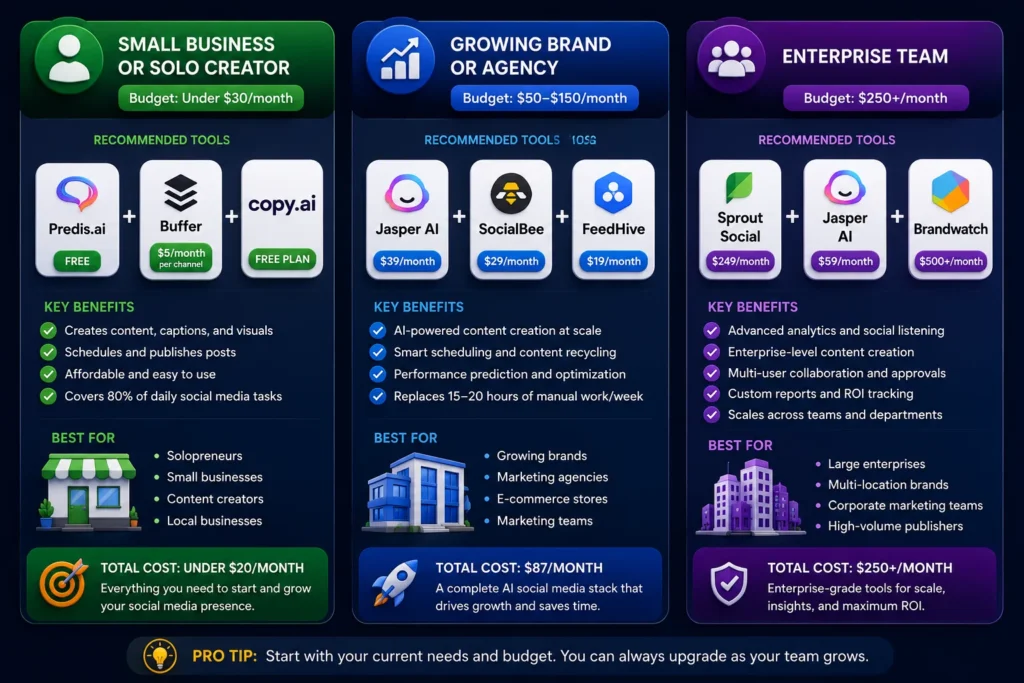
Small Business or Solo Creator (Budget: Under $30/month)
Start with Predis.ai (free) for content creation and Buffer ($5/month per channel) for scheduling. These 2 tools together cover 80% of daily social media tasks for under $20/month total.
Add Copy.ai’s free plan if you need more caption variations. That combination handles content writing, visual creation, and publishing without breaking your budget.
Growing Brand or Agency (Budget: $50–$150/month)
Jasper AI ($39/month) for content creation, SocialBee ($29/month) for scheduling, and FeedHive ($19/month) for performance prediction. Total: $87/month for a full AI social media stack that replaces 15–20 hours of manual work per week.
Enterprise Team (Budget: $250+/month)
Hootsuite ($99/month) or Sprout Social ($249/month) as the central hub, plus Brandwatch (custom pricing) for deep social listening. Enterprise teams also benefit from Jasper AI for content at scale.
Can AI Replace Your Social Media Manager?
No — AI replaces tasks, not judgment. A social media manager using AI handles 3x more work than one working without it. The tools write captions, but a human decides which caption fits the moment. AI suggests posting times, but a human knows when a scheduled post needs to be pulled due to breaking news.
The brands winning on social media in 2026 use AI as an execution engine while humans own strategy, creativity, and relationship management. That combination outperforms both pure AI automation and pure manual management.
5 Mistakes to Avoid When Using AI for Social Media

- Publishing AI content without editing. AI drafts are starting points. Every caption needs a human read before publishing. Unedited AI copy often misses cultural nuance, trending language, and brand-specific context.
- Using one tool for everything. No single AI tool does everything well. The best setups combine a content creation tool (Jasper or Copy.ai) with a scheduling tool (Buffer or SocialBee) and an analytics tool (Sprout Social or FeedHive).
- Ignoring posting frequency balance. AI scheduling tools will fill your calendar if you let them. Brands posting 5+ times per day on Instagram see a 15% drop in per-post engagement compared to brands posting 3–4 times. Set frequency limits in your scheduling tool.
- Skipping A/B testing. Every AI tool generates caption variations. Most marketers publish the first option. Run 2 versions of every important post and track which performs better — this data makes your AI tool smarter over time.
- Not training brand voice. Generic AI output sounds generic. Tools like Jasper AI and Copy.ai accept brand voice inputs. Feed them 5–10 examples of your best-performing posts upfront, and every future output will sound like your brand.
Final Word
These 12 AI tools for social media marketing cover every budget and use case — from free tools for solo creators to enterprise platforms for global brands. The right combination depends on your team size, posting volume, and primary goals.
Start with 1–2 tools from the free tiers. Get comfortable with how AI fits your workflow. Then add paid tools as your content output grows.