

Free SEO tools give you real data on keyword rankings, backlinks, site health, and organic traffic — without paying for an Ahrefs or Semrush subscription. In 2026, free tools cover 80% of what most website owners actually need.
This guide covers 20 free SEO tools (Search Engine Optimization tools), organized by 6 categories. Each tool is tested and genuinely free — not locked behind a trial.
Quick answer: The 5 most powerful free SEO tools in 2026 are Google Search Console (GSC), Google Analytics 4 (GA4), Ahrefs Free Tools, Semrush Free Plan, and Screaming Frog (free up to 500 URLs). Start with these 5 before adding anything else.
Free SEO Tools — 6 Categories at a Glance
| Category | Best Free Tool | What It Does |
| Keyword Research | Google Keyword Planner | Search volume, keyword ideas |
| Site Audits | Screaming Frog (500 URLs) | Crawl errors, broken links, metadata |
| Backlink Analysis | Ahrefs Free Backlink Checker | Top 100 backlinks, Domain Rating |
| Rank Tracking | Google Search Console | Rankings, impressions, clicks |
| Technical SEO | PageSpeed Insights | Core Web Vitals, speed issues |
| Content Optimization | Google Trends | Trending topics, seasonal demand |
1: Free Keyword Research Tools
Keyword research tells you what your audience searches for and how competitive each term is. These 4 free tools cover the full keyword research workflow without spending a cent.
1.1 Google Keyword Planner
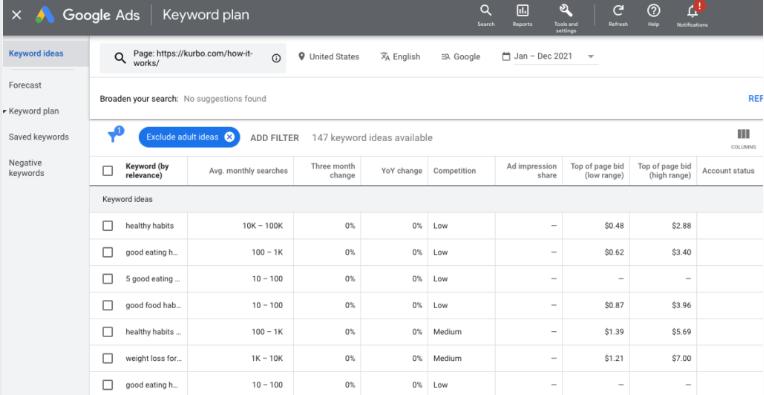
Best for: Finding search volume and keyword ideas directly from Google’s database.
Google Keyword Planner is the most accurate free keyword research tool available. It pulls data directly from Google Ads, giving you real monthly search volume ranges, keyword ideas from a seed keyword or URL, and competition levels (low, medium, high) for each term. Access it free with any Google account at ads.google.com — no active ad campaigns needed.
Best use: Type your main topic, export keyword ideas, filter for low-competition keywords with 1,000+ monthly searches. These are your fastest ranking opportunities.
Limitation: Search volume shows ranges (1K–10K) instead of exact numbers unless you run active Google Ads campaigns.
1.2 Ubersuggest (Free Plan)
Best for: Beginners who want keyword ideas, domain overview, and backlink data in one dashboard.
Ubersuggest’s free plan gives you 3 searches per day with keyword difficulty scores, content ideas, and a basic domain overview showing organic traffic estimates. The free backlink data shows domain authority and the top pages driving traffic to any website — enough to understand a competitor’s SEO strategy without paying anything.
Limitation: 3 daily searches is restrictive. Use it strategically — 1 competitor domain analysis and 2 keyword searches per day.
1.3 Answer The Public (Free Tier)
Best for: Finding the exact questions people type into Google around any topic.
Answer The Public pulls Google autocomplete and voice search data, organizing results into question-based clusters: who, what, where, when, why, how. The free plan allows 3 searches per day. One search generates 50–150 question variations for a single keyword.
Best use: Build FAQ sections. Search your primary keyword, export the question wheel, and turn the top 8 questions into H2 subheadings in your article.
1.4 Google Trends
Best for: Spotting rising and seasonal keyword demand before competitors do.
Google Trends shows search interest over time for any keyword — from the past hour to the past 5 years. It breaks results down by region, city, and related queries. Free, no account required. A keyword with 10,000 monthly searches but a 60% downward trend over 12 months is a poor long-term investment. A keyword with 2,000 searches but a rising trend is the smarter bet.
Best use: Compare 2–3 keyword variations in Trends before deciding which one to target.
2: Free Site Audit Tools
A site audit identifies technical errors, on-page SEO gaps, and crawl issues that stop Google from ranking your pages. These 4 tools find those problems for free.
2.1 Screaming Frog SEO Spider (Free — Up to 500 URLs)
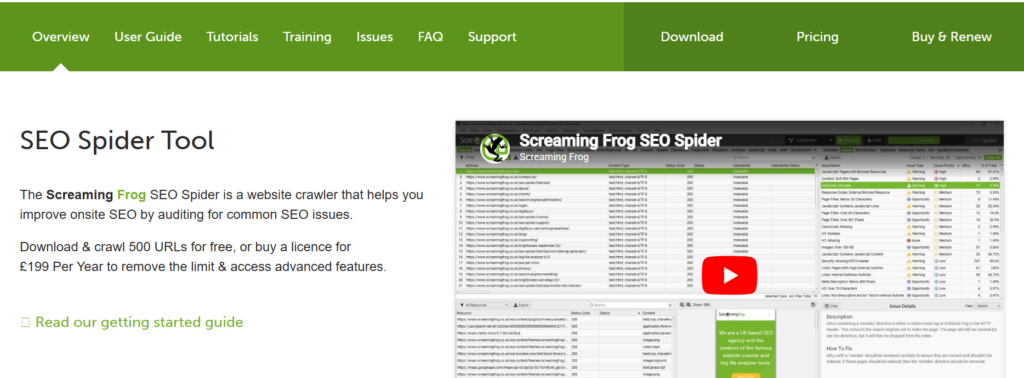
Best for: Deep technical SEO audits on sites with up to 500 pages.
Screaming Frog is the gold standard for technical SEO audits. The free version crawls up to 500 URLs and surfaces 7 critical issue types: broken links (404 errors), duplicate title tags, missing meta descriptions, redirect chains, duplicate content, images missing alt text, and pages blocked from crawling. It exports every finding to a spreadsheet. Most mid-size websites have 30–80 fixable issues on their first crawl.
Limitation: The 500 URL cap means large websites need the paid version ($259/year). For small business sites and blogs, the free version handles everything.
2.2 Google Search Console (GSC)
Best for: Seeing exactly how Google crawls, indexes, and ranks your site.
Google Search Console is the single most important free SEO tool. Google gives you direct data on 4 critical metrics: keywords bringing traffic, clicks and impressions per page, indexing errors, and average search position. GSC also sends alerts for manual penalties, security issues, and mobile usability problems.
Best daily use: Check 3 things each morning — pages that lost clicks in the past 7 days, new indexing errors, and keywords ranking in positions 8–15 (fastest wins).
2.3 SEOptimer (Free Audit)
Best for: Getting a fast 100-point SEO score for any URL in under 60 seconds.
SEOptimer analyzes any webpage across 100 SEO data points and returns a graded report covering on-page optimization, page speed, mobile responsiveness, social signals, and backlink data. No account required for the free audit. It flags specific issues with clear fix instructions — the fastest way to identify what is holding a page back.
2.4 Seobility Free SEO Checker
Best for: Auditing on-page SEO and technical issues on individual pages.
Seobility crawls any URL and evaluates over 200 SEO factors including metadata quality, heading structure, content length, internal link structure, page speed, and AI visibility score. The free plan checks 1 full website (up to 1,000 pages) with weekly crawls.
3.1 Free Backlink Analysis Tools
Backlinks remain Google’s strongest ranking signal. These 3 free tools show you who links to your site, your Domain Rating (DR), and your competitors’ best link opportunities.
3.2 Ahrefs Free Backlink Checker
Best for: The most accurate free backlink data available — no account required.
Ahrefs’ free backlink checker shows the top 100 backlinks to any URL or domain, along with the Domain Rating (DR) and URL Rating (UR) of each linking page. No registration needed for basic checks. This is the same backlink database that powers Ahrefs’ $129/month paid plan. The free keyword generator also shows keyword difficulty scores for up to 100 keyword ideas per search.
Best use: Analyze your top 3 competitors’ backlinks. Sites linking to them are your best outreach targets — they already publish content in your niche.
3.3 Moz Link Explorer (Free — 10 Searches/Month)
Best for: Checking Domain Authority (DA) and finding link-building opportunities.
Moz Link Explorer gives you 10 free searches per month with full Domain Authority (DA) scores, Page Authority (PA) data, spam scores, and top linking domains to any website. DA is Moz’s proprietary 1–100 score predicting how likely a site is to rank in Google — widely used by SEOs to qualify link prospects. The free account also includes 1 campaign with rank tracking for up to 10 keywords.
3.4 SEO Review Tools Free Backlink Checker
Best for: Bulk backlink checking with anchor text analysis and domain authority filtering.
SEO Review Tools offers a free backlink checker showing linking domains, anchor text distribution, and DA scores. It allows data export to Excel and includes wildcard search to find all backlinks to a domain pattern. Over 175,000 users have registered for free accounts.
4: Free Rank Tracking Tools
Rank tracking shows where your pages appear in Google for specific keywords. These 3 free tools track positions without a subscription.
4.1 Google Search Console — Rank Data
Best for: Tracking average position for every keyword your site already ranks for.
GSC shows average search position for every keyword driving traffic to your site — covering up to 1,000 queries per page in the Performance report. Filter by country, device (mobile vs desktop), and date range going back 16 months. This is the most accurate free rank tracking because Google provides the data directly.
4.2 Semrush Free Plan (10 Searches/Day)
Best for: Competitor keyword and ranking research with 10 daily queries.
Semrush’s free account gives you 10 searches per day across domain overviews, keyword research, and backlink data. Each domain overview shows estimated organic traffic, top organic keywords, and the top 5 pages driving the most traffic — enough to reverse-engineer a competitor’s SEO strategy in 10 minutes. The free plan tracks positions for up to 10 keywords across 1 project.
4.3 Bing Webmaster Tools
Best for: Tracking rankings on Bing — a search engine with 6.4% global market share.
Bing Webmaster Tools is completely free and mirrors most of GSC’s functionality for Bing search results. It shows keyword rankings, click data, crawl errors, and linking domains. Worth setting up alongside GSC because Bing’s index often surfaces indexing problems that Google hasn’t flagged yet.
5: Free Technical SEO Tools
Technical SEO ensures Google can crawl, index, and understand your pages. These 4 tools fix the technical issues that silently kill rankings.
5.1 Google PageSpeed Insights
Best for: Measuring Core Web Vitals (CWV) and page speed on mobile and desktop.
Google PageSpeed Insights scores any URL from 0–100 on performance and provides specific fixes ranked by impact. It measures 3 Core Web Vitals that Google uses as ranking signals: LCP (Largest Contentful Paint — main content load speed), INP (Interaction to Next Paint — page response speed), and CLS (Cumulative Layout Shift — page stability during load). A PageSpeed score below 50 on mobile actively hurts rankings.
5.2 Google Rich Results Test
Best for: Validating schema markup (structured data) to earn rich snippets in search results.
Rich snippets — star ratings, FAQ dropdowns, recipe cards, and event listings — increase click-through rates by 20–30% on average. The Rich Results Test checks whether your schema markup is valid and tells you exactly which rich result types your page is eligible for. Free at search.google.com/test/rich-results, no account required.
5.3 Google Mobile-Friendly Test
Best for: Confirming a page passes Google’s mobile usability requirements.
Google uses mobile-first indexing — it ranks the mobile version of your page, not the desktop version. The Mobile-Friendly Test checks whether your page renders correctly on a phone and flags 6 common mobile issues: text too small to read, clickable elements too close together, content wider than the screen, viewport not set, page resources blocked, and slow mobile load time.
5.4 Ahrefs Free Website Authority Checker
Best for: Checking Domain Rating (DR) without an Ahrefs subscription.
Domain Rating is Ahrefs’ measure of a website’s backlink strength on a 0–100 scale. The free Website Authority Checker at ahrefs.com/website-authority-checker shows DR, total backlinks, and referring domains for any URL — no account needed. Use it to qualify link prospects before outreach.
6: Free On-Page & Content SEO Tools
On-page SEO tools optimize individual pages for target keywords. These 2 free tools handle the most important on-page factors.
6.1 Yoast SEO (Free WordPress Plugin)
Best for: Optimizing every page and post on a WordPress site for on-page SEO.
Yoast SEO is the most widely installed SEO plugin with over 13 million active installations. The free version gives traffic light scoring for on-page SEO on every post and page: green means optimized, orange means improvable, red means critical issues present. It checks keyword density, meta description length, title tag structure, internal linking, readability, and schema markup. The free version also auto-generates XML sitemaps and handles canonical URLs.
6.2 Google Analytics 4 (GA4)
Best for: Understanding which pages drive the most organic traffic and how users behave after arriving.
Google Analytics 4 is free website analytics that tracks user behavior, traffic sources, conversion events, and page engagement metrics. For SEO, GA4 shows which organic search pages have the highest engagement rate and which pages have high bounce rates — signaling content that needs improvement. Connect GA4 with Google Search Console to see the full picture: what keywords bring users to your site (GSC), and what those users do after arriving (GA4).
All 20 Free SEO Tools — Quick Reference Table
| # | Tool | Category | Free Limit | Best For |
| 1 | Google Keyword Planner | Keyword Research | Unlimited | Search volume, keyword ideas |
| 2 | Ubersuggest | Keyword Research | 3 searches/day | Beginner keyword + domain analysis |
| 3 | Answer The Public | Keyword Research | 3 searches/day | Question-based keyword discovery |
| 4 | Google Trends | Keyword Research | Unlimited | Trending & seasonal keywords |
| 5 | Screaming Frog | Site Audit | 500 URLs | Technical site crawl & audit |
| 6 | Google Search Console | Site Audit / Rank | Unlimited | Indexing, clicks, rankings |
| 7 | SEOptimer | Site Audit | Unlimited basic | 100-point page SEO score |
| 8 | Seobility | Site Audit | 1 site, 1K pages | 200+ factor page audit |
| 9 | Ahrefs Free Backlink Checker | Backlinks | Top 100 backlinks | Backlink data, DR score |
| 10 | Moz Link Explorer | Backlinks | 10 searches/month | Domain Authority, spam score |
| 11 | SEO Review Tools | Backlinks | Unlimited basic | Anchor text, bulk checks |
| 12 | GSC Rank Data | Rank Tracking | 1,000 queries/page | Actual Google rank positions |
| 13 | Semrush Free Plan | Rank Tracking | 10 searches/day | Competitor keyword research |
| 14 | Bing Webmaster Tools | Rank Tracking | Unlimited | Bing rankings, crawl data |
| 15 | PageSpeed Insights | Technical SEO | Unlimited | Core Web Vitals, speed fixes |
| 16 | Rich Results Test | Technical SEO | Unlimited | Schema markup validation |
| 17 | Mobile-Friendly Test | Technical SEO | Unlimited | Mobile usability check |
| 18 | Ahrefs Authority Checker | Technical SEO | Unlimited | Domain Rating check |
| 19 | Yoast SEO (WordPress) | On-Page SEO | Unlimited (plugin) | On-page optimization scores |
| 20 | Google Analytics 4 | Content / Analytics | Unlimited | Traffic sources, user behavior |
How to Build a Free SEO Tool Stack in 3 Steps
Most beginners install 10 tools and use none of them properly. Build your stack in order — add each layer only after the previous one is set up and running.
Step 1 — Install the 3 Google Foundation Tools (Day 1)
Set up Google Search Console, Google Analytics 4, and Google PageSpeed Insights. These 3 tools give you direct Google data on rankings, traffic, and page speed. Verify your site in GSC and submit your XML sitemap. Connect GA4 to GSC inside the GSC Settings panel. This setup takes 30 minutes.
Step 2 — Run Your First Technical Audit (Week 1)
Download Screaming Frog, crawl your site, and export the results. Fix the 3 highest-priority issues first: broken links (404 errors), missing meta descriptions, and duplicate title tags. Install Yoast SEO on WordPress if applicable and get your top 5 pages to green status.
Step 3 — Add Keyword and Backlink Research (Week 2)
Use Google Keyword Planner to build a list of 50 target keywords. Use Ahrefs Free Backlink Checker to analyze your top 3 competitors’ backlinks. Use Semrush Free Plan (10 searches/day) to check competitor organic traffic. With this 3-step stack, you run a fully functional SEO operation at $0/month.
Free SEO Tools vs Paid SEO Tools — What You Actually Get
| Feature | Free Tools | Paid Tools (Ahrefs/Semrush) |
| Keyword Data | Volume ranges, basic ideas | Exact volumes, full difficulty data |
| Backlink Data | Top 100 links, DR score | Full database, historical data |
| Site Audit | Up to 500 URLs (Screaming Frog) | Unlimited URLs, scheduled crawls |
| Rank Tracking | GSC data (past 16 months) | Daily tracking, unlimited keywords |
| Competitor Analysis | 10 searches/day (Semrush) | Unlimited, full traffic estimates |
| Historical Data | 16 months (GSC) | Up to 5+ years |
| Cost | $0/month | $99–$499/month |
Free tools cover everything a solo website owner, blogger, or small business needs. Paid tools become necessary when managing 10+ client sites, tracking 500+ keywords daily, or running advanced competitor analysis at scale.
Frequently Asked Questions
Are free SEO tools accurate?
Yes — Google’s own free tools (GSC, GA4, Keyword Planner) are 100% accurate because Google provides the data directly. Third-party free tools like Ahrefs and Semrush free tiers use the same databases as their paid versions, just with daily search limits.
Can I rank on Google using only free SEO tools?
Yes. Thousands of websites reach Page 1 using only GSC, Screaming Frog, and Google Keyword Planner. Tools do not rank your site — content quality, backlinks, and technical health rank your site. Tools help you identify what to fix and what to create.
What is the single best free SEO tool?
Google Search Console is the single best free SEO tool. It gives you direct Google data on every keyword your site ranks for, every indexing error, and every page’s click and impression performance — all free, unlimited, and straight from Google.
Do I need a paid SEO tool?
No — not until you are managing multiple sites, tracking hundreds of keywords daily, or running a client SEO agency. Start free. Upgrade only when your free tools hit their limits on a task you perform daily.
What free SEO tool should beginners start with?
Beginners start with 3 tools: Google Search Console to see rankings and errors, Yoast SEO (if using WordPress) to optimize on-page content, and Google PageSpeed Insights to fix Core Web Vitals. These 3 cover the foundation of technical SEO, on-page optimization, and performance monitoring — all free.
Conclusion — The Best Free SEO Tools in 2026
The best free SEO tool stack in 2026 covers every major SEO function at $0/month.
Google Search Console tracks rankings and indexing. Screaming Frog audits technical issues. Ahrefs Free Tools analyze backlinks. Google Keyword Planner finds search volume. PageSpeed Insights fixes Core Web Vitals.
Start with these 5. Master them completely before adding more. Free tools provide 80% of the SEO data you need — and for most solo site owners, bloggers, and small businesses, 80% is more than enough to reach Page 1.
The remaining 20% — deeper historical data, unlimited keyword tracking, and automated reporting — is where paid tools earn their cost. But that decision comes after free tools have already grown your organic traffic.
